Adapted from the canonical English UIX documentation by Lint-Free-Technology/uix, CC BY 4.0. Source:
dev/ 9.0.0-beta.2, revision 26e54e6, reviewed 22 October 2026. This source mirror may describe preview behavior beyond stable 8.4.0. Markup adapted for this site; the original documentation remains authoritative.
Developers - Custom cards
Generally UIX should work with all custom cards.
Where UIX will work out of the box
- Custom card loaded by Home Assistant and not child of another custom card. In this case UIX patches via
<hui-card>. - Custom card includes
<ha-card>and stores card config in eitherconfigor_configproperty. In this case UIX patches via<ha-card>.
Where UIX will NOT work without further code or styling from parent card
- Custom card loaded by another custom card that does NOT use modern
<hui-card>method AND- Custom card does NOT use
<ha-card>OR - Custom card uses
<ha-card>but does NOT useconfigor_configproperty to store config. In this case UIX cannot find theuix:config for styling and does not apply.
- Custom card does NOT use
If your custom card's use falls into the case where it is not working with other custom cards, you can apply UIX directly using uix.applyToElement().
customElements.whenDefined("uix-node").then((uix) => {
  uix.applyToElement(
    el, // The root element
    "type", // Determines which theme variables should apply (uix-<type>, uix-<type>-yaml)
    config, // The UIX configuration. See below
    variables, // Any variables passed on to jinja templates, preferably { config: <element configuration> }. Default: {}
    shadow // whether the styles should be based in the #shadow-root of el. Default: true
    cls // An extra class to apply to the element. Default: undefined
  )
}The UIX configuration is an object with the following optional properties:
style- UIX style definition (string or object)theme- Home Assistant theme name applied only to this styled element subtree (uix.themetakes precedence over inherited/current theme)class- string or array of classes to apply to the elementdebug- boolean to enable debugging mode for the element (defaultfalse)
When theme is set, UIX applies Home Assistant frontend-style applyThemesOnElement() logic directly on the target element before processing UIX theme styles/macros.
Example
Custom card javascript:
const LitElement = customElements.get("ha-panel-lovelace")
  ? Object.getPrototypeOf(customElements.get("ha-panel-lovelace"))
  : Object.getPrototypeOf(customElements.get("hc-lovelace"));
const html = LitElement.prototype.html;

class MyAwesomeCard extends LitElement {
  setConfig(config) {
    this._config = config;
  }

  firstUpdated() {
    customElements
      .whenDefined("uix-node")
      .then((uix) =>
        uix.applyToElement(
          this,
          "card",
          this._config.uix,
          { config: this._config },
          true,
          "type-custom-my-awesome-card"
        )
      );
  }

 render() {
    return html`
      <div class="content">
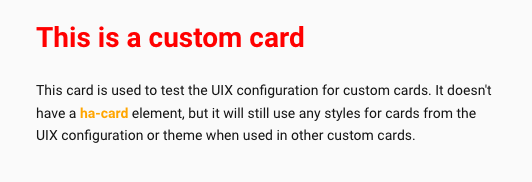
        <h1> This is a custom card</h1>
        <div class="my-class">
          This card is used to test the UIX configuration for custom cards.
          It doesn't have a <b>ha-card</b> element,
          but it will still use any styles for cards from the UIX configuration or theme
          when used in other custom cards.
        </div>
      </div>
    `;
  }
}

customElements.define("my-awesome-card", MyAwesomeCard);With the following dashboard configuration:
type: custom:my-awesome-card
uix:
  style: |
    .content {
      padding: 0 20px 20px 20px;
    }
    h1 {
      color: red;
}And this theme:
UIX Test:
  uix-theme: UIX Test
  uix-card: |
    b {
      color: orange;
    }
  dark: