
HA Grafik Visual Studio
Studio 0.1.296: The remaining 62 widget types gain DE/EN/FR properties and runtime messages, optional Climate controls and source/attribute/unit checks. Existing projects and package versions remain valid; new groups start disabled. Guide and limits. Mocked tests do not verify real devices/Companion. Audit report.
Since 0.1.289, Save changes colour during saving: amber while the request is pending, green after success and red on failure. The original colour returns after 1.4 seconds. This also applies to autosave in both light and dark appearance.
From Studio 0.1.287, every widget has an In Runtime verstecken (Hide in runtime) checkbox at the top of its WIDGET tab. It hides the widget in runtime independently of z-index while retaining editor visibility. Calculations and data flow remain active, including hidden Number widgets and Math boxes. Save the project after changing it.
Other changes through Studio 0.1.285: SVG lines and Value connections support vertical starting positions, vertical-first orthogonal routes and less sensitive point dragging. Rotary outputs directly control line animation. The Number-to-Math example explains battery net flow using O - P; the gallery shows the editor setup before the animated demo.
New in Studio 0.1.280: Solar 0.1.3 offers seven bottom line ports on the standalone inverter. Also includes four PV inputs on the stack head, battery ports at the enclosure seam, separate battery reading colors and a mirrored solar panel with base.
New in Studio 0.1.215: The external Material Design 1.0.0 package contains 49 widget entries, including autocomplete, inputs, buttons, displays, lists, charts, calendar and page layouts. A comparison project prepares the widget-by-widget review.
New in Studio 0.1.214: Material Design package 0.3.0 adds Dialog iFrame as the third widget, with source, sandbox, scrolling and compact/advanced dialog layout options.
New in Studio 0.1.210: the external Material Design set starts with Preview Color Schemes, 26 palette rows and Classic/Material 3/Project default. Package 0.1.0 is prepared for testing community catalog registration.
Package catalog and downloads
The Weather and Heating 1.7.1 package uses the original preview images from ioBroker weather-and-heating for seven widgets. “Inform my landlord” uses an envelope icon because the image referenced upstream is missing. The original images' MIT license is included. The update only changes widget images and preserves existing settings. Updating the images requires Studio 0.1.216 or newer.
Starting with catalog website 0.1.11, the original package uploaded during registration is stored privately for admin review. Analysis and approval reuse this file without another upload; a replacement file can optionally be uploaded. Administration can download the original. SHA-256 detects changes. The private copy is removed after approval, rejection, deletion or the 90-day retention period. Older submissions require one new upload because previous versions only analyzed the file.
Starting with catalog website 0.1.10, widget registration only accepts .wg and tool registration only accepts .tp. The file picker filters by the appropriate extension. The server checks upload filenames and download URL paths, while continuing to validate package contents and manifest type. Upload validation also applies in Administration.
Catalog website 0.1.9 asks whether a package needs new Studio features (Yes/No/Unsure); Yes or Unsure requires a description and allows the minimum version to be marked “Not yet known”. No requires a specific minimum version. Administration determines the minimum version during review and after any required Studio changes; a specific version must be entered before approval. An optional package upload identifies its renderers/actions; without a file, analysis occurs in Administration. Unknown features receive “Studio update required” and remain outside the public catalog until implemented and reviewed again. The operator must upload the website update.
Starting with Studio 0.1.212, a red mdi:alert icon marks the GitHub source and installation notice for widget and tool packages. Installation requires accepting the installation risk.
Starting with Studio 0.1.213, available package updates have a green card border. New compatible packages highlight only the Install button in blue. The highlight disappears after successful installation or update.
Studio detects newer approved package versions when opening package settings or choosing Refresh catalog, then offers Update. Package IDs must match, including packages previously installed locally or from GitHub. Updates are installed deliberately. Arbitrary GitHub repositories are not monitored automatically.
Widget packages, tool packages and helper tools are provided centrally in the UGSo package catalog at visualstudio.ugso-software.de. These include Technic, Weather/Heating, the Colorpicker, and Widget Test and Tools Test for checking package installation. The Packer for Windows and Linux is listed under Helper tools. Descriptions and instructions remain on this open-source site; package files are provided through the catalog subdomain.
A different kind of Home Assistant dashboard. Grafik Visual Studio is an experimental Home Assistant app with a freeform editing surface and a separate runtime. It is still in early development; its project format and controls may change. It is not yet intended for production dashboards.
Editor and keyboard shortcuts · All 74 widgets · SVG-Line · SVG LineBox with videos · SVG LineBox Math · Widget package interface · Tool package interface · Package packer · Source and Home Assistant app
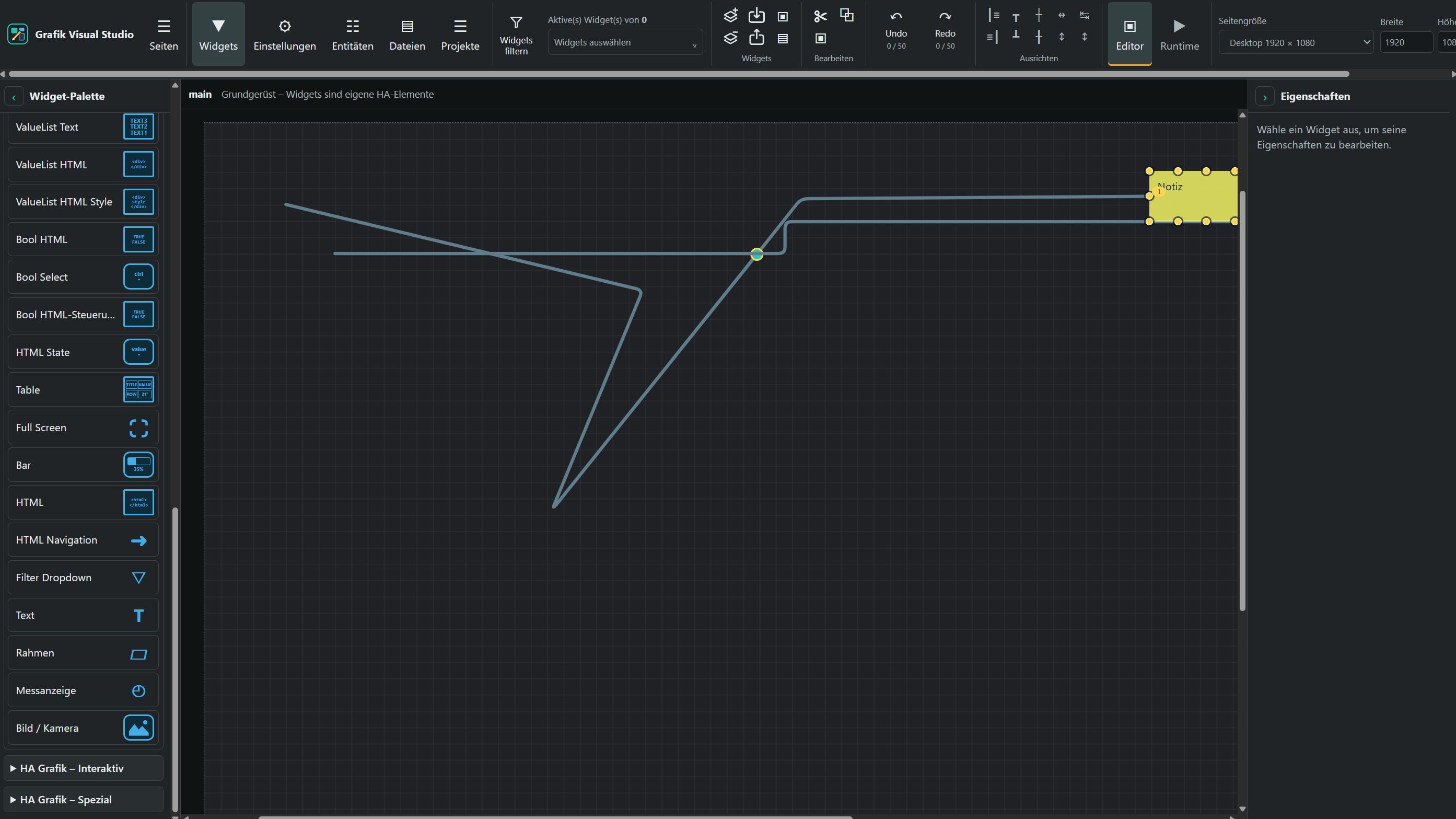
Editor view with drawn connection lines. Open the full-resolution image.
What works today
Starting with Studio 0.1.222, the light theme uses a gray editor canvas with anthracite grid lines. The dark theme keeps the existing background with slightly brighter grid lines for easier orientation. This appearance applies to the editor. Runtime continues to use the saved page background.
Starting with Studio 0.1.221, the interface automatically follows the light/dark preference reported by the browser. The toolbar, sidebars, dialogs and fields also update while Studio is open, without reloading. Saved page backgrounds and widget colors are preserved; changing the theme does not modify saved project settings.
Starting with Studio 0.1.220, new pages open the VIEW tab directly. It contains general CSS, background, font and text, options, navigation, app bar and responsive settings. Sections can expand and collapse but have no activation checkboxes: page values are preserved on save. Checkboxes for individual options such as “Default” remain available.
Starting with Studio 0.1.218, failed HA switch commands show a red runtime alert with the entity ID and error reason. Since 0.1.219, clicking a blocked Switch also explains the reason, such as a missing or unavailable HA state. Switch widgets control Home Assistant in runtime; editor interaction is a preview.
Starting with Studio 0.1.217, the entity dialog searches friendly names, custom and original entity names, entity IDs and device names. Multiple search words can match across entity and device metadata: Licht Tv1, for example, finds an entity named “Licht” on device “TV1”. Search is case-insensitive; matching device groups automatically expand while searching.
- Manage multiple projects and named pages, each with its own size, background and widgets. The runtime presents visible pages separately.
- Place, move, resize and name widgets on a scrollable canvas, and arrange them with z-index. The editor supports multiple selection, alignment, size matching, copy/paste and undo/redo.
- Use 74 widgets from “HA Grafik – Basis”, “HA Grafik – Interaktiv”, “HA Grafik – Spezial”, “HA Grafik – Datenfluss” and “HA Grafik – Gauges”. These include HTML, images, numbers, controls, tables, calendars, dashboard embedding, SVG lines, calculations, converters and ten measuring instruments. The palette shows a preview or icon appropriate to each type.
- Edit layout, CSS, “Generell”, visibility and docking-point properties. The editor widget filter uses the “Filterwort” property in “Generell”.
- Draw connection lines with intermediate points, explicitly enabled collector points, colors, arrowheads and animations. Lines that cross do not connect automatically.
- Select files from Home Assistant's
/config/www/studiofolder and upload supported files. The file browser automatically creates this root folder when opened. If write permissions are missing, it displays instructions for creating the folder manually. Widget image selection uses the same folder; applied and copied paths start with/local/studio/. The entity browser can search entities and current states and insert entity IDs into widget fields. - The Files search field searches filenames and paths across all
/config/www/studiosubfolders, independently of the open folder and without case sensitivity. Results show image previews and relative paths; file-type filters and image insertion remain available. Clearing the search restores the open folder listing. - Individual and all-widget checkboxes immediately update the editor selection. The selection list stays in front of all widgets. From 0.1.209, use the toolbar's Copy and Delete actions for checked widgets; duplicate buttons at the bottom of the list have been removed. Deletion uses the confirmation dialog. Signal images, extra controls and docking points are disabled for new widgets and can be enabled when needed.
- Drag any selected widget to move the entire selection together, including after copying and pasting. Selected SVG lines and intermediate points move with the selection while existing attachments remain intact. Locked widgets block the shared move. Each drag can be undone as one operation.
- Deleting widgets opens a confirmation dialog listing their IDs. Cancel or Escape aborts deletion. “Suppress this question for the next 5 minutes” skips subsequent deletion prompts for five minutes in the open editor. Deletion remains undoable.
- Save changes automatically after a configurable delay (five seconds by default) or save manually. Widgets can be exported and imported as JSON.
- The interface follows Home Assistant's language: German when HA is set to German, English otherwise. Under Settings → Language, each browser can choose Automatic, German or English. Project and widget content is left unchanged.
Updates through 0.1.158
The widget reference now explains the VIS2-inspired value lists, Bool HTML/Checkbox/Select, Table, HTML State, Bar, HTML/navigation, filters, String and Input val, with screenshots. CSS General stays enabled for every widget. Migration hints can be switched off under Settings → General.
Dashboard in widget under Special embeds an HA dashboard up to 800 × 640 pixels. View in widget continues to embed Studio pages. Data flow provides Value connection, Value converter and Value calculation; LineBox Math supports four calculations and configurable presentation.
Planned extensions
Grafik Visual Studio is intended to support creating, distributing and independently displaying visualizations. The following items are development goals. They do not describe fully available features yet; their scope and order may change based on testing and feedback. The current feature set is listed under What works today.
- Complete project export and import: Back up and transfer projects, including required images, settings and package information, and restore them on another installation. The planned project package export extends the existing JSON export of individual widgets.
- Standalone runtime on a separate device: Run finished visualizations independently of the editor, for example on a Raspberry Pi used as a wall display or control panel. The Home Assistant connection should be configurable. The existing runtime view provides the foundation; a standalone runtime package for separate devices is a further goal.
- Companion app for connecting installations: An additional application should simplify setup and connections between Studio, the runtime and Home Assistant. Its exact scope is still to be defined.
- Extended Packer with GitHub features: Create widget and tool packages locally, with optional creation of a GitHub repository and publishing of package versions. Local packaging should remain available without GitHub. See Package packer for information about the existing tool.
- Direct package registration from the Packer: Submit packages to the community catalog, using the same registration process and information about licenses, authors, privacy and Studio compatibility as the website. Public catalog entries will still require review.
Information to document alongside these features
- Portability: Which resources an export includes, which extension packages are required on the destination, and which connections need to be configured there again.
- Credentials: How Home Assistant tokens and GitHub credentials are handled. Normal project exports should not contain unencrypted secrets.
- Runtime requirements: Supported devices, setup, network connections and behavior when a connection is lost.
- Package maintenance and compatibility: Versioning, updates and compatibility between Studio, the runtime and extension packages.
- Getting involved: Opportunities for testers and developers, plus ways to report problems and suggest improvements. Problems can be reported through GitHub Issues. Readers arriving from a forum post can also contact the author through that forum's chat feature; experience with ioBroker VIS/VIS2 is welcome.
Planned: Calendar JSON integration
A dedicated Home Assistant integration is planned to expose HA calendars as JSON event lists for calendar widgets and other consumers. The sensor state will contain the event count; the full list will be stored in the events attribute. Date range and refresh interval should be configurable. Event Calendar already supports calendar.* directly; the reusable integration has not been implemented yet.
Current limitations
In the runtime, Sensor, String, Red Number, Bar, Gauge and Bool HTML read a bound Home Assistant entity every five seconds; visibility rules use those states too. A Switch widget can control switch, light and input_boolean through HA service actions and then displays the confirmed HA state. Other data and control widgets still use local sample values. Selecting an entity ID there does not yet provide live binding. Visibility's “Nur für Gruppen” option and multi-views behavior are not fully implemented. The editor filter affects only the editor view.
The app provides one standard Home Assistant Ingress entry. Separate sidebar entries for editor and runtime require the additional experimental integration from custom_components/ha_grafik_visual_studio, which requires Home Assistant OS or Supervised with Supervisor. The repository README explains the installation.
The interface draws inspiration from VIS2. Grafik Visual Studio is an independent implementation; it does not ship VIS2 code or widgets.