Adapted from the canonical English UIX documentation by Lint-Free-Technology/uix, CC BY 4.0. Source:
dev/ 9.0.0-beta.2, revision 26e54e6, reviewed 22 October 2026. This source mirror may describe preview behavior beyond stable 8.4.0. Markup adapted for this site; the original documentation remains authoritative.
Button spark
The button spark inserts a Home Assistant ha-button element as a DOM sibling immediately before or after a target element inside a forged element.
The button can display:
- a text label (
label) - an icon in the label position (
icon) - a leading icon (
start_icon) - a trailing icon (
end_icon)
icon and label are mutually exclusive — when icon is set, the icon is placed in ha-button's label slot and label is ignored.
When only icon is set (no label), the button automatically receives styling to match Home Assistant's icon button.
Optionally the button can be made interactive with tap/hold/double-tap actions.
Basic usage
Add a button entry to forge.sparks with either after or before to specify the target element and where the button is inserted relative to it.
The after/before value is a selector that locates the target element within the forged element. It supports the same DOM navigation syntax as UIX styles, including $ to cross shadow-root boundaries.
type: custom:uix-forge
forge:
  mold: card
  sparks:
    - type: button
      after: hui-tile-card $ ha-tile-icon
      label: Toggle
      entity: light.living_room
      tap_action:
        action: toggle
element:
  type: tile
  entity: light.living_room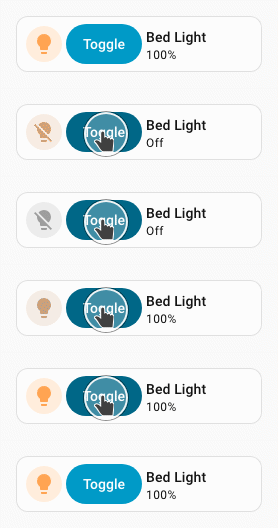
TIP
You can use the uix_forge_path() DOM helper to take the guesswork out of finding the right path for after/before.
Configuration
| Key | Type | Required | Default | Description |
|---|---|---|---|---|
type | string | ✅ | — | Must be button. |
after | string | one of after/before ✅ | When the UIX Forge element is using Blank card config, the default is uix-forge-blank-card $ div.content. Otherwise, "". If you wish to target before using Blank card config, set explicitly to "". | UIX selector for the reference element. The button is inserted as a sibling after the matched element. |
before | string | one of after/before ✅ | — | UIX selector for the reference element. The button is inserted as a sibling before the matched element. |
entity | string | — | Entity ID passed to action handlers (e.g. toggle). Required for entity-based actions. | |
icon | string | — | MDI icon string (e.g. mdi:lightbulb) placed in the label slot of the button. Mutually exclusive with label. | |
color | string | — | Icon color when in icon-only mode (e.g. red, var(--primary-color)). Only applied when icon is set. | |
label | string | "" | Text label displayed inside the button. Mutually exclusive with icon. | |
start_icon | string | — | MDI icon string (e.g. mdi:play) displayed before the label. | |
end_icon | string | — | MDI icon string (e.g. mdi:chevron-right) displayed after the label. | |
variant | string | — | Button color variant. One of brand, neutral, danger, warning, success. When omitted, the default Home Assistant button variant brand is used, except when icon is set in which case neutral is default. | |
appearance | string | — | Button appearance. One of accent, filled, outlined, plain. When omitted, the default Home Assistant button appearance accent is used, except when icon is set in which case plain is default. | |
size | string | — | Button size which can be s (small) or m (medium). | |
tap_action | action | — | Action to perform on tap. | |
hold_action | action | — | Action to perform on hold. | |
double_tap_action | action | — | Action to perform on double tap. |
INFO
- Exactly one of
afterorbeforemust be provided. - The spark targets the first element matched by
after/before. - The inserted
ha-buttonis placed in a containing<div>inside the same parent as the target element — it is a sibling, not a child. iconandlabelare mutually exclusive. Wheniconis set,labelis ignored.- Margin styling of
-6pxis applied to labelled buttons, while icon-only buttons default to0px. This margin can be controlled by the CSS variable--uix-button-margin. - When only
iconis set (nolabel), the button automatically receives styling to match Home Assistant's icon button.
Actions
When one or more action keys are set (tap_action, hold_action, double_tap_action), the button fires the corresponding Home Assistant action. Provide entity when using entity-based actions such as toggle or more-info.
type: custom:uix-forge
forge:
  mold: card
  sparks:
    - type: button
      after: hui-tile-card $ ha-tile-icon
      label: Living Room
      entity: light.living_room_rgbww_lights
      tap_action:
        action: toggle
      hold_action:
        action: more-info
element:
  type: tile
  entity: light.bed_light
INFO
When used inside a tile card the button's click events are isolated from the tile card's own action handler — only the button's configured actions fire.
CSS variables
| Variable | Default | Description |
|---|---|---|
--uix-button-margin | -6px or 0px for icon-only button | Sets the margin for the button. Default for a labelled button suits Home Assistant Frontend styling defaults. |
--uix-button-label-text-wrap | wrap | Sets the button label text wrap. Default for ha-button is wrap. Set to nowrap if you wish for your labels to not wrap. This may or may not be needed based on the element in which the button is placed. You will need to set on a tile card like shown in the examples below. |
--uix-button-border-color | revert-layer | Sets the button border color. This usually comes from a combination of the button variant and appearance but can be set directly with this CSS variable. |
--uix-icon-button-background-color | currentColor | Sets the icon-only button background color. If not set the default of currentColor will pick up color config if set, otherwise whatever the current color is where the icon-only button is placed. By default, this color only shows when hovered. |
--uix-icon-button-background-opacity | 0 | Sets the icon-only background opacity. Set to a value (0-1) to always show the background color at this opacity value. |
--uix-icon-button-background-color-hover | var(--uix-icon-button-background-color, currentColor) | Set to override the icon-only background color when hovered. |
--uix-icon-button-background-opacity-hover | calc(var(--uix-icon-button-background-opacity, 0) + 0.1) | Set to override the icon-only opacity when hovered. |
Examples
Button after the tile icon with a toggle action and fluorescent light icon
type: custom:uix-forge
forge:
  mold: card
  grid_options:
    columns: 9
  sparks:
    - type: button
      after: hui-tile-card $ ha-tile-icon
      label: Living Room
      end_icon: mdi:lightbulb-fluorescent-tube-outline
      entity: light.living_room_rgbww_lights
      tap_action:
        action: toggle
  uix:
    style: |
      :host {
        --uix-button-label-text-wrap: nowrap;
      }
element:
  type: tile
  entity: light.bed_light
Button before the tile icon with a danger variant
type: custom:uix-forge
forge:
  mold: card
  sparks:
    - type: button
      before: hui-tile-card $ ha-tile-icon
      label: Turn off
      variant: danger
      appearance: plain
      entity: light.living_room
      tap_action:
        action: call-service
        service: light.turn_off
        target:
          entity_id: light.living_room
element:
  type: tile
  entity: light.bed_light
Button with start and end icons
type: custom:uix-forge
forge:
  mold: card
  sparks:
    - type: button
      after: hui-tile-card $ ha-tile-icon
      start_icon: mdi:play
      label: Scene
      end_icon: mdi:chevron-right
      tap_action:
        action: perform-action
        perform_action: light.turn_off
        target:
          entity_id: light.living_room_rgbww_lights
element:
  type: tile
  entity: light.bed_light
Icon-only button
Here we need to style the icon button size to match the tile icon size, which is 36px. The default icon button size is 48px.
type: custom:uix-forge
forge:
  mold: card
  sparks:
    - type: button
      before: hui-tile-card $ ha-tile-info
      icon: mdi:lightbulb
      color: var(--red-color)
      entity: light.living_room_rgbww_lights
      tap_action:
        action: toggle
element:
  type: tile
  entity: light.bed_light
  uix:
    style: |
      ha-button {
        --ha-icon-button-size: 36px;
      }
Button with tile card styling for spacing with flex css properties
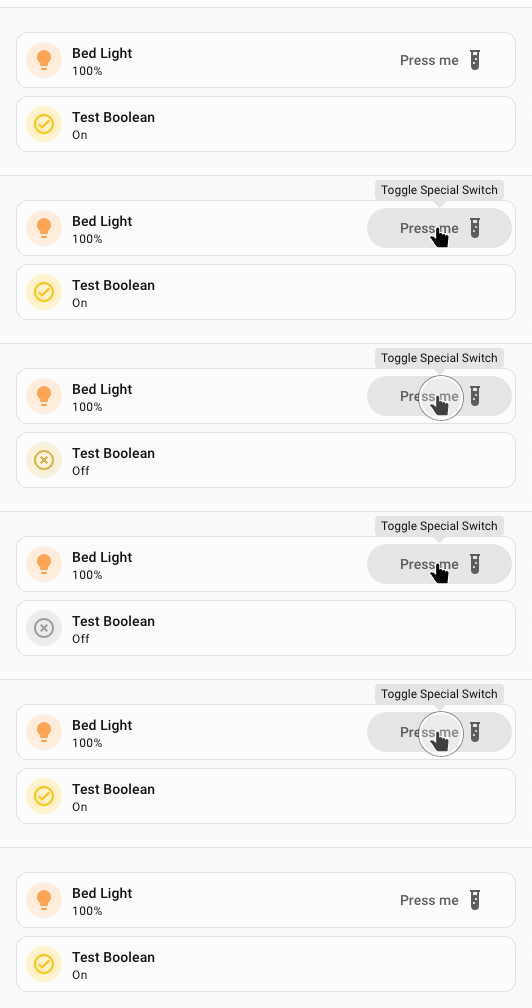
Also included is a 💬 Tooltip spark
type: custom:uix-forge
forge:
  mold: card
  grid_options:
    columns: 12
    rows: 1
  sparks:
    - type: tooltip
      for: hui-tile-card $ ha-button
      content: Toggle Special Switch
    - type: button
      after: hui-tile-card $ ha-tile-info
      label: Press me
      variant: neutral
      appearance: plain
      end_icon: mdi:test-tube
      entity: input_boolean.test_boolean
      tap_action:
        action: toggle
      hold_action:
        action: more-info
element:
  type: tile
  entity: light.bed_light
  vertical: false
  features_position: bottom
  uix:
    style: |
      ha-tile-info {
        flex: 2;
      }
      ha-button {
        margin-top: -2px;
        flex: 1;
      }
Variant and appearance
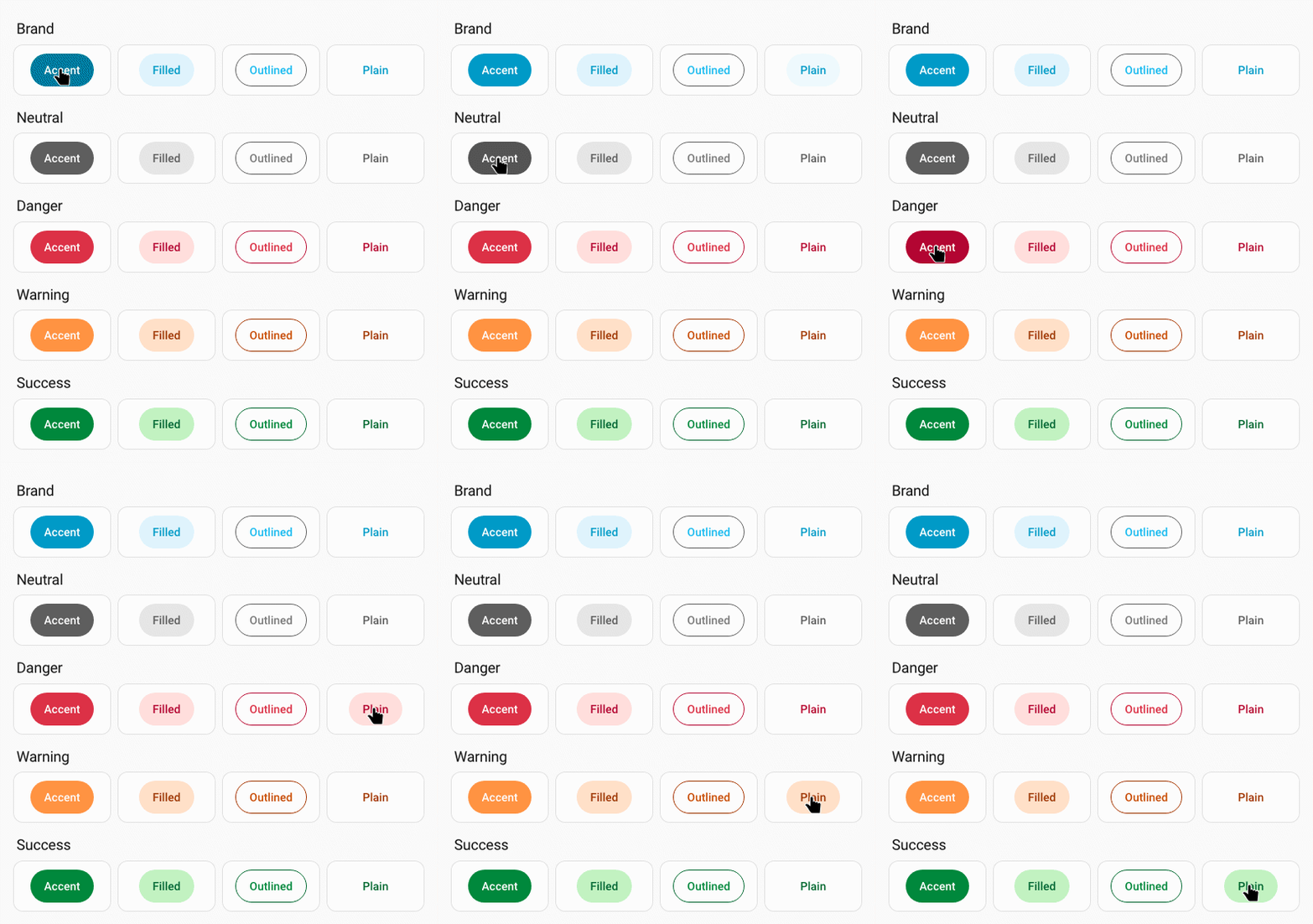
Button variant can be one of brand, neutral, danger, warning, success. When omitted, the default Home Assistant button variant brand is used.
Button appearance can be one of accent, filled, plain. When omitted, the default Home Assistant button appearance accent is used.
Button variant and appearance image