Adapted from the canonical English UIX documentation by Lint-Free-Technology/uix, CC BY 4.0. Source:
dev/ 9.0.0-beta.2, revision 26e54e6, reviewed 22 October 2026. This source mirror may describe preview behavior beyond stable 8.4.0. Markup adapted for this site; the original documentation remains authoritative.
Tile Icon spark
The tile-icon spark inserts a ha-tile-icon element as a DOM sibling immediately before or after a target element inside a forged element.
The icon source can be:
- a fixed MDI icon string (
icon) - an SVG path string (
icon_path) - an image URL (
image_url) - an entity whose state icon is displayed via
ha-state-iconplaced in the tile icon'siconslot (entity)
Optionally the tile icon can be made interactive with tap/hold/double-tap actions.
Basic usage
Add a tile-icon entry to forge.sparks with either after or before to specify the target element, and one of icon, icon_path, image_url, or entity to provide the icon source.
The after/before value is a selector that locates the target element within the forged element. It supports the same DOM navigation syntax as UIX styles, including $ to cross shadow-root boundaries.
TIP
If you are inserting a tile icon before another tile icon, you will need to be specific in your selector so as to not select the inserted icon on updates. Tile icons added by this spark have an attribute data-uix-forge-tile-icon-id so you can use this with your selector. e.g. hui-tile-card $ ha-tile-icon:not([data-uix-forge-tile-icon-id])
type: custom:uix-forge
forge:
  mold: card
  sparks:
    - type: tile-icon
      before: hui-tile-card $ ha-tile-icon:not([data-uix-forge-tile-icon-id])
      icon: mdi:star
      color: red
element:
  type: tile
  entity: light.bed_light
Configuration
| Key | Type | Required | Default | Description |
|---|---|---|---|---|
type | string | ✅ | — | Must be tile-icon. |
after | string | one of after/before ✅ | — | UIX selector for the reference element. The icon is inserted as a sibling after the matched element. When the UIX Forge element is using Blank card config, the default is uix-forge-blank-card $ div.content. Otherwise, "". If you wish to target before using Blank card config, set explicitly to "". |
before | string | one of after/before ✅ | — | UIX selector for the reference element. The icon is inserted as a sibling before the matched element. |
icon | string | one of icon/icon_path/image_url/entity ✅ | — | MDI icon string (e.g. mdi:star). icon can also be used to replace the default entity icon if entity is set. |
icon_path | string | one of icon/icon_path/image_url/entity ✅ | — | SVG path string passed to ha-tile-icon as its iconPath property (rendered via ha-svg-icon). |
image_url | string | one of icon/icon_path/image_url/entity ✅ | — | URL of an image to display inside the tile icon. |
entity | string | one of icon/icon_path/image_url/entity ✅ | — | Entity ID whose current state object is passed to a ha-state-icon placed in the tile icon's icon slot, displaying the entity's native state icon. |
color | CSS color | - | Color to apply to tile icon. Overrides entity state color | |
tap_action | action | — | Action to perform on tap. | |
hold_action | action | — | Action to perform on hold. | |
double_tap_action | action | — | — | Action to perform on double tap. |
INFO
Exactly one of after or before must be provided, and exactly one icon source (icon, icon_path, image_url, or entity) must be provided.
TIP
You can use the uix_forge_path() DOM helper to take the guesswork out of finding the right path for before/after.
Actions
When one or more action keys are set (tap_action, hold_action, double_tap_action), the tile icon is automatically made interactive.
type: custom:uix-forge
forge:
  mold: card
  sparks:
    - type: tile-icon
      after: hui-tile-card $ ha-tile-icon
      entity: light.ceiling_lights
      tap_action:
        action: toggle
      hold_action:
        action: more-info
element:
  type: tile
  entity: light.bed_light
INFO
- The spark targets the first element matched by
after/before. - The inserted
ha-tile-iconelement is placed in the same parent as the target element — it is a sibling, not a child. - If you are inserting a tile icon before another tile icon, you will need to be specific in your selector so as to not select the inserted icon on updates. Tile icons added by this spark have an attribute
data-uix-forge-tile-icon-idso you can use this with your selector. e.g.hui-tile-card $ ha-tile-icon:not([data-uix-forge-tile-icon-id])
Examples
Insert an icon after an element using a fixed icon with color blue
type: custom:uix-forge
forge:
  mold: card
  sparks:
    - type: tile-icon
      after: hui-tile-card $ ha-tile-icon
      icon: mdi:chevron-right
      color: blue
element:
  type: tile
  entity: light.bed_light
Insert an entity state icon before an element
type: custom:uix-forge
forge:
  mold: card
  sparks:
    - type: tile-icon
      before: hui-tile-card $ ha-tile-icon:not([data-uix-forge-tile-icon-id])
      entity: light.ceiling_lights
element:
  type: tile
  entity: light.bed_light
Insert an icon using an SVG path
Path is a filled circle
type: custom:uix-forge
forge:
  mold: card
  sparks:
    - type: tile-icon
      after: hui-tile-card $ ha-tile-icon
      icon_path: "M12 2C6.48 2 2 6.48 2 12s4.48 10 10 10 10-4.48 10-10S17.52 2 12 2z"
      color: red
element:
  type: tile
  entity: light.bed_light
Insert an image icon
type: custom:uix-forge
forge:
  mold: card
  sparks:
    - type: tile-icon
      after: hui-tile-card $ ha-tile-icon
      image_url: /local/media/daniel_craig_cropped.png
element:
  type: tile
  entity: light.bed_light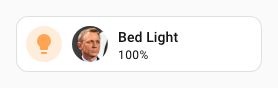
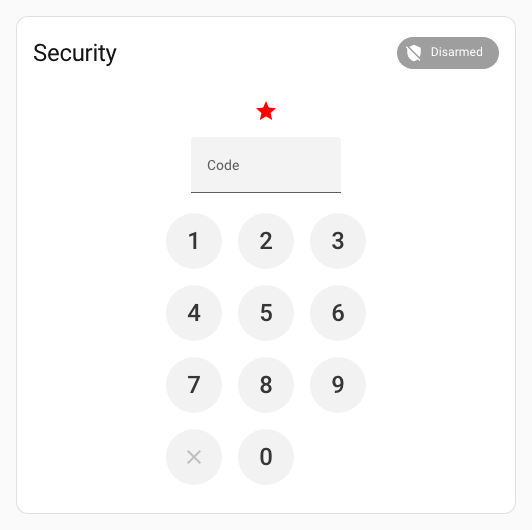
Cross a shadow boundary to reach a deeply nested element
type: custom:uix-forge
forge:
  mold: card
  sparks:
    - type: tile-icon
      before: hui-alarm-panel-card $$ ha-input
      icon: mdi:star
      color: red
element:
  type: alarm-panel
  states: []
  entity: alarm_control_panel.security