
Date and time
Schedules and triggers since 0.1.60
Click the CRON field in Triggers → Schedule. The popup offers Wizard / Simple / CRON, following the ioBroker dialogs. Simple builds intervals; Wizard also offers a specific time with numeric weekdays. CRON provides component tabs and optional seconds. OK applies a valid rule; Cancel and Escape preserve the previous value. Light/dark appearance and all DE/EN/FR dialog texts are supported.
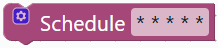
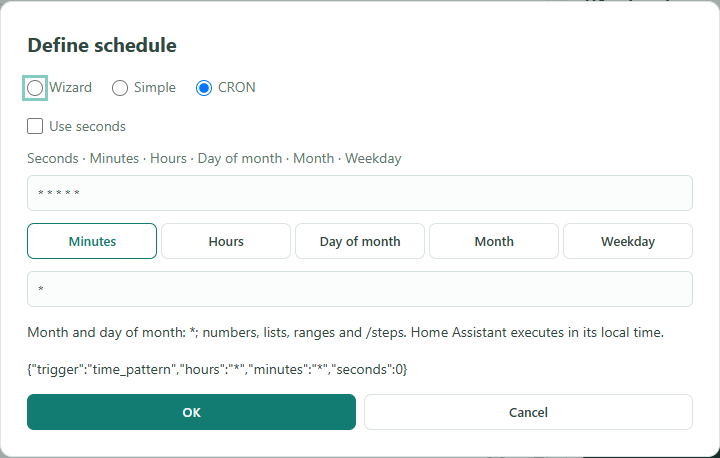
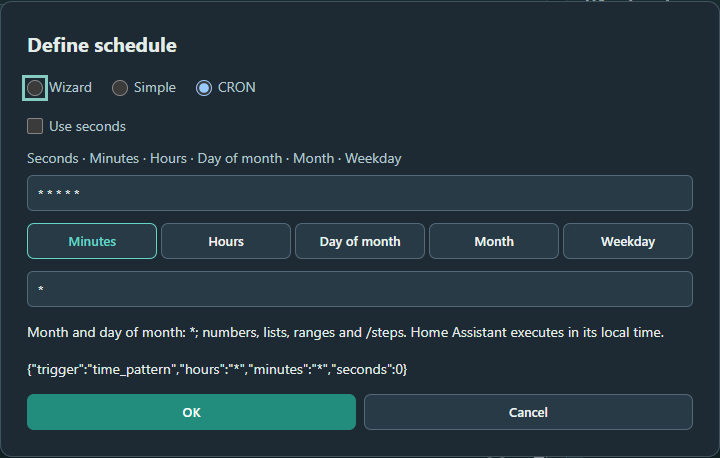
Five fields: minute, hour, day of month, month, weekday. Six fields start with seconds. Numbers, lists, ranges and steps are supported. Examples: */5 * * * * every five minutes; */30 * * * * * every 30 seconds; 30 7 * * 1-5 weekdays at 07:30. Sunday is 0 or 7. Home Assistant executes in its local time; no browser timer. Steps apply to clock fields: */7 minutes starts again at minute 0 each hour.
Output uses native time_pattern or time triggers with weekday. Month and day of month must be *. Dates, validity ranges, one-off events and astronomical day/night windows are not yet implemented in the dialog. Unsupported rules are explicitly rejected. Weekday rules expand to at most 2000 individual times; more frequent rules are rejected. Calendar triggers and HA conditions remain available separately. Project JSON retains the CRON rule; YAML retains its equivalent native HA structure.
| ioBroker trigger | Blocks for HA / HA equivalent |
|---|---|
| If object / If objects | State trigger with one or multiple entities; from/to, attribute and hold time. No ioBroker object IDs. |
| Triggered by / acknowledge value | HA has no ioBroker ack equivalent here. No artificial acknowledgement block. |
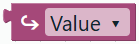
| ↪ Value / Message | New trigger-data value block: current/previous state, entity ID, trigger ID/type, MQTT payload/JSON and event data. Missing data returns none; convert numbers as needed. |
| Astro with offset | Sunrise/sunset with optional minute offset. Other sun conditions via native HA blocks. |
| Schedule / CRON | Dialog above, native HA execution. No dynamic registration of named ioBroker schedules. |
| Message received | MQTT or HA event trigger with filters; no direct ioBroker script-message receiver. |
| Log message | HA event trigger for system_log_event, when HA is configured to provide those events. No dedicated ioBroker log listener. |
| File/enum events | No direct implementation. Use an available HA integration and its events/entities. |
| Further native HA triggers | MQTT, template, webhook, device, tag, conversation, zone and geolocation are now directly in Triggers, without duplicates in HA advanced. |
References: original ioBroker trigger blocks, native HA triggers. Appearance follows the original; execution and data remain specific to HA.
Since 0.1.11, the category includes seven additional blocks. All blocks with images. The editor uses the original Blockly library; HA Jinja generation is an original UGSo implementation. References: ioBroker JavaScript adapter time blocks and Blockly block definitions.
ioBroker / Blocks for HA
| ioBroker | Our block / implementation |
|---|---|
| Current time comparison with fixed clock time | Clock comparison: less, less/equal, greater, greater/equal, equal, between and outside. End field appears for periods. |
| Current time checkbox and plugged-in value | Clock comparison with inputs: text blocks for start/end. Uncheck current time to expose a datetime socket. |
| Current time as Date object or formatted value | Current datetime plus separate formatter, preventing formatted text from entering datetime calculations. |
| Calculated time | Calendar start: today, tomorrow, week (Monday), month and year. Other ioBroker calendar boundaries are not implemented yet. |
| Astro event time with offset | Next sun event: rise, set, dawn, dusk, solar noon and midnight, with positive/negative minute offset. |
| Calculate time, base ± number and unit | Shift datetime: datetime ± number; milliseconds, seconds, minutes, hours or days. |
Connections and use
Comparisons return Boolean, fitting conditions, AND/OR/NOT and If. Datetimes have a typed Time connection: current time, calendar start, sun event and time calculation can nest. Numeric blocks supply offset/amount; formatted clock text supplies comparison boundaries. Formatting supports HH:mm, HH:mm:ss, ISO date, German date, date/time, ISO with timezone and Unix seconds.
Example: Current datetime → Shift datetime (+ 30 minutes) → Format (HH:mm), then assign to a variable:
{{ (now() + timedelta(minutes=30)).strftime("%H:%M") }}Between 22:00 and 06:00 includes the overnight period. Start is included, end excluded. Equal boundaries describe an empty period; outside is its complement. Fixed clock times must be HH:mm or HH:mm:ss. Dynamic text boundaries must provide the same format at runtime; invalid values cause an HA template error. Comparison has second precision: equal 12:00 means 12:00:00 and is not a reliable time trigger.
Execution and limitations
Templates execute in Home Assistant. The browser builds YAML and does not run a scheduling engine. Functions use HA's configured timezone: HA date/time functions. Calendar starts use local midnight; day arithmetic follows the local calendar, including DST changes. Adding 24 hours does not guarantee 24 elapsed UTC hours across a timezone transition.
Sun values come from HA Sun integration attributes. They represent the next event, which may be tomorrow. UTC values are converted to HA local time before calculation/formatting. Missing values, such as an unavailable integration or uncomputable event, cause a template error rather than a fabricated fallback time.
A comparison checks the clock when its condition is evaluated. It does not start the automation or wait for the target time. Use a time or sun trigger for that. The new sun value block does not replace a sun trigger.
Blocks project JSON preserves block shapes, selections and dynamic sockets. Opening YAML retains the time templates but displays them as general template blocks. A datetime previously assigned to an HA variable may become text; our variable getter therefore has no Time connection. Nest datetime blocks directly or, since 0.1.12, connect the getter through To datetime. Conversion and units. Converted runtime numbers now also fit datetime amounts and sun offsets.
Verification covers Blockly/YAML roundtrips, typed connections, dynamic fields and Jinja checks for overnight boundaries and DST. Execution on a real HA system has not been verified.