
Dashboard User Manager
Version 0.1.11 · DE / EN / FR · MIT · stable
Since 0.1.7, the bundled PNG icon appears in the HA app tile and interface header and is provided as the app favicon. The approved artwork is included in the ZIP and UGSo package without external image services. The HA sidebar retains its configured MDI symbol. Settings, saved dashboard selection and dashboard data are preserved during the icon update.
A standalone HA app: select a dashboard, display users as columns and views as rows, and edit assignments using checkboxes. ATLAS is not required. The interface uses 90 vw and 90 vh; the bounded checkbox table scrolls vertically and horizontally when needed. Swipe inside it or focus the region and use arrow/Page Up/Page Down keys. View names and user headers stay fixed; shorter displays use compact headers. Scroll outside the table to move the surrounding page.
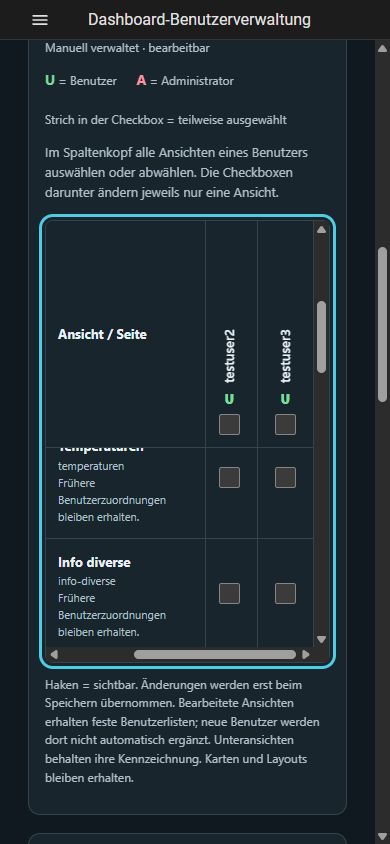
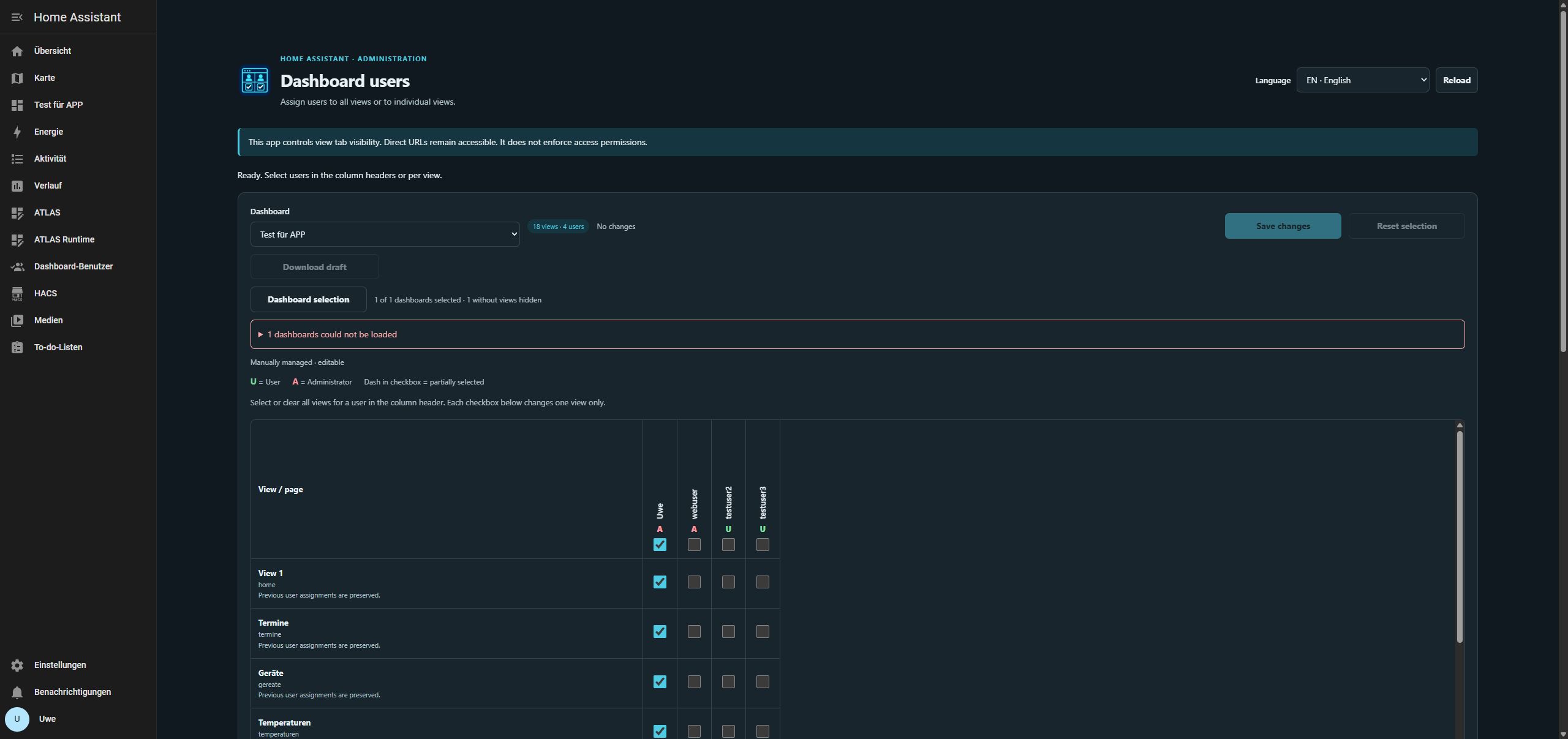
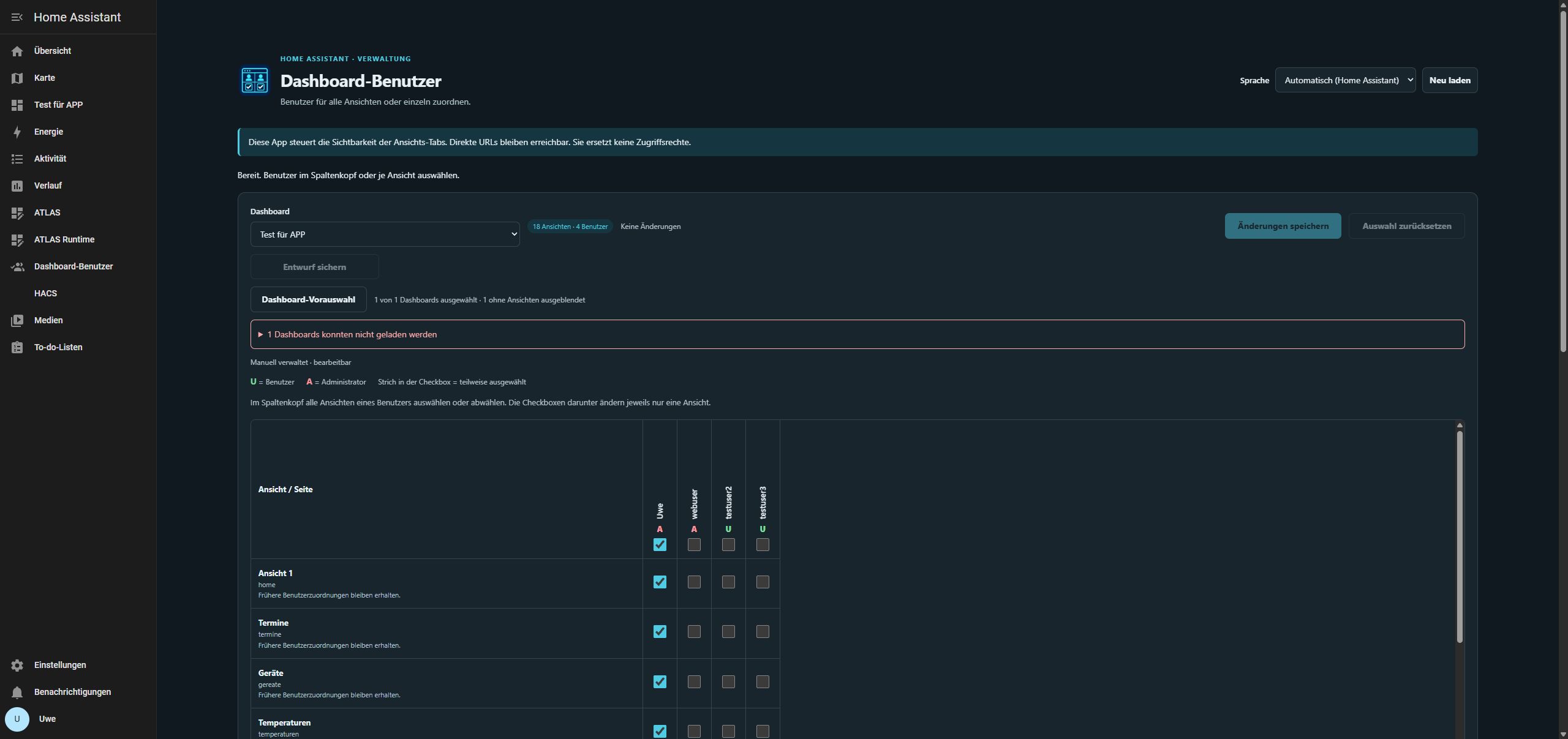
Actual screenshot from .177, 20 October 2026, after full restoration and the 0.1.10 update: English interface, 18 views and four users. The existing dashboard was unchanged.
Filter and preselect dashboards
Since 0.1.6, a migrated HA overview appears once: the lovelace entry and its legacy default access are merged. Preferences previously saved through either entry are preserved. Equal titles with different actual dashboard paths remain separate; titles alone do not identify duplicates. Older dashboard backups remain compatible. This follows HA’s default access mapping.
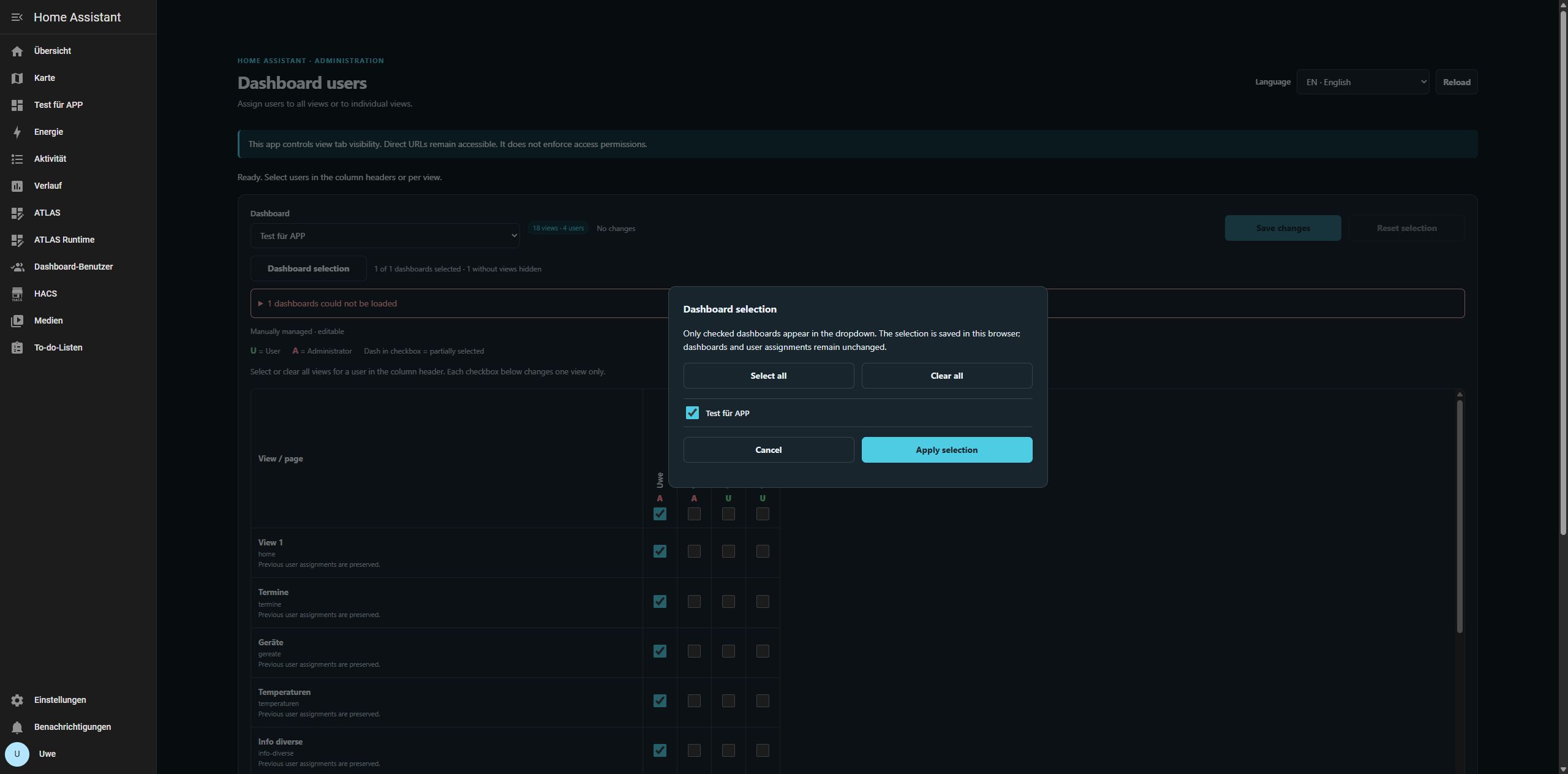
The dropdown contains only successfully loaded dashboards with at least one view. Confirmed empty entries and app panels without views are hidden. Load errors are listed separately by dashboard name and are not treated as empty; retry with Reload. YAML or generated dashboards with views remain marked read-only.
Dashboard selection opens a dialog with a checkbox for each available dashboard, Select all, Clear all, Cancel and Apply selection. Only checked entries appear in the dropdown. Preferences are stored per browser and HA address without changing dashboards or user assignments. An empty selection is valid. Add new dashboards to an existing saved selection when needed. Previously selected entries retain their preference during load errors.
Keeping the current dashboard preserves unsaved assignments. Excluding it asks for confirmation before discarding unsaved changes. If browser storage is blocked, an error is shown and the app does not pretend that the selection was saved.
Install through UGSo HA Apps
Create a full HA backup first. Add this repository under Settings → Apps → App store → Repositories:
https://github.com/rockbaer2007/ugso-ha-mqtt-addonsInstall Dashboard-Benutzerverwaltung, start it and open it through HA Ingress. Only active HA administrators can use the interface. No additional LAN port or manually entered token. Requires Home Assistant with Supervisor and a manually managed dashboard. YAML and generated dashboards are read-only.
Adding the repository does not change an existing local app. Local and repository apps have different identifiers and separate private data. Before deliberately switching sources, create a full backup including the old app and download its JSON backups. Do not uninstall the local app without preserving its data; use only one app at a time for editing.
Assign users
- Select a dashboard. All its views, including subviews, are listed.
- Select webuser, for example, in the column header to check that user for every editable view. Clearing the header removes the user from these views.
- Adjust individual view checkboxes. A dash in the header means partially selected.
- Choose Save changes. Only then does the app create a backup and write the change. Reset selection discards unsaved changes only.
Green U = user, red A = administrator. These actions do not change account roles. Original dashboard, view and user names, cards, layouts, paths and untouched views are preserved. Previous user IDs are not silently removed. Edited views use fixed user lists; users created later are not automatically added.
Visibility is not access control
This app controls view tab visibility. Direct URLs remain accessible; it does not replace HA access permissions. See the official HA documentation.
Timeout, cancellation and draft
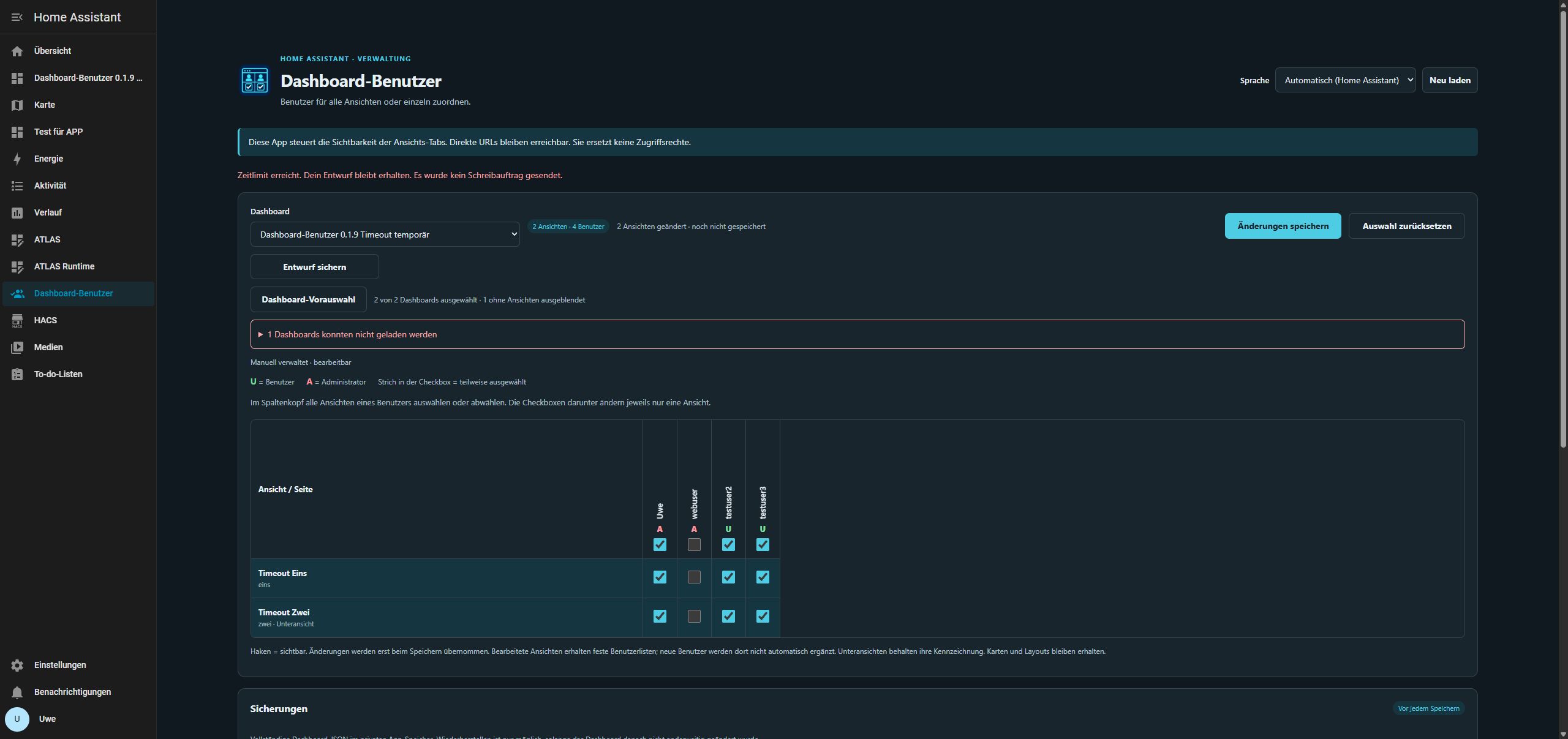
From 0.1.9, waiting for a save ends after at most 30 seconds. Stop waiting ends it sooner. Checkbox selections remain intact; Download draft saves the planned assignments as a local JSON file. This is a draft record, not a full dashboard backup or an automatically importable project. Download it before closing the tab.
If no write request was sent, saving can be retried after fixing the cause. With Save outcome unknown, saving stays disabled: Check server state reads the actual state and fences any unused save plan against delayed execution. It distinguishes an already saved draft, an unchanged server and intervening changes, without writing again. Verification also has a timeout and cancellation control. In a conflict, download the draft before deliberately reloading.
Cancellation only stops local waiting; a write already received by the server can still finish. Do not retry blindly. An app restart may require a new session: download the draft first, reload the session and deliberately reapply the intended changes. There is no automatic replay; closing/reloading does not preserve the draft unless you downloaded the file.
Automatic language
Automatic (Home Assistant) follows the HA interface language. If the surrounding HA frame cannot be read, the preferred browser language is used. Unsupported languages fall back to English. You can also select DE, EN or FR at the top; this preference is stored for that browser only.
Labels, help, dialogs, status messages, dates, accessibility text and server responses are translated. Switching language preserves unsaved checkboxes. Custom names and stored dashboard data are never translated. No cloud translation or extra keys are required.
Backups and conflicts
Before every change, a complete dashboard JSON is written to /data/backups/ in private app storage. Use Download JSON to keep a PC copy. These files contain all card configuration and should be treated as confidential. App updates preserve this storage; download it or include the app in a full HA backup before uninstalling.
The app compares the dashboard and user list with the loaded state and reads the result back after saving. Intervening changes block the save. HA has no atomic compare-and-save operation: avoid simultaneous edits in another editor during the short save phase.
Restore first creates another backup and is blocked if the dashboard was edited after the corresponding change. If a save is unconfirmed, do not retry blindly; compare the current state with the backup.
Restore the app or a full HA backup
A full HA backup must include Dashboard User Manager under apps: that contains its private dashboard backups. The actual dashboards belong to HA configuration. Create a fresh complete backup before restoring and avoid concurrent changes.
Under Settings → System → Backups, open the intended backup. Select only Dashboard User Manager to restore the app and its private backups while leaving the current HA dashboard configuration intact. For full restoration, select Home Assistant, settings/history, the relevant folders and all required apps. The entire selected scope returns to the backup timestamp, including removal of later test objects. HA is unavailable during its restart.
After completion, reopen the app through the HA sidebar. Check its version, existing dashboard backups, dashboard/user counts and browser selection. Resume editing only after confirming the server state. Keep full backups and private dashboard JSON confidential; browser selection is not a data backup.
Update a local ZIP installation
After a full backup, copy all new source files into /addons/dashboard_user_manager/ and run in the HA terminal:
touch /addons/dashboard_user_manager/config.yaml
ha store reload
ha apps info local_dashboard_user_managerOnce version_latest shows the new version, update the app in HA. touch changes the timestamp only, helping Supervisor detect files extracted from older ZIPs with preserved timestamps. Do not uninstall. Repository apps update through their repository.
Verification and limits
0.1.11 – Scrolling correction: User-reported issue: vertical operation was unavailable on a BV6200 Pro running Android 14/DokeOS 4.0, a Samsung Tablet A6 running Android 11, the Companion app and Chrome. The table now has an explicitly vertically scrollable bounded height, horizontal scrolling when needed, touch gestures and scroll containment relative to the surrounding page. DE/EN/FR accessibility labels name both directions.
Updated .177 from 0.1.10 to 0.1.11 after a fresh full backup. Chrome checks at 390 × 844, 844 × 390, 768 × 1024 and 1024 × 768 pixels: vertical scrolling reaches the last view, with horizontal scrolling in the narrow phone format. Headers and the first column stay fixed; all checkbox states, 18 views, four users, selection and 17 private backups are retained. No assignments were saved. All 23 checked original HA files remain byte-identical; projects, plugins and trash are unchanged. 33 Python and 19 Node checks plus amd64/arm64 Docker builds passed.
Device testing confirmed by the user on 20 October 2026: Vertical and horizontal scrolling work in 0.1.11 in the actual Home Assistant Companion app on both phone and tablet: BV6200 Pro running Android 14/DokeOS 4.0 and Samsung Tablet A6 running Android 11. This completes the previously pending finger-scrolling check on both devices. This result is based on the user’s explicit feedback; the Chrome checks above remain a separate verification record.
0.1.10 – “Not saved” and “conflict” server outcomes checked on .177: After a fresh full backup, a real socket abort prevented the first and third save commands for the separate test dashboard from being sent to HA. The unchanged application initially treated both outcomes as uncertain and preserved every draft checkbox. Existing dashboards and access permissions were untouched.
- Not saved: The HA file remained exactly equal to its initial state before and after Check server state. The interface reported that the server was unchanged, the draft was preserved and saving could be retried. Saving was enabled again; the deliberately started second attempt then saved exactly the two intended user lists and successfully read them back.
- Conflict: After the third save command was also prevented, a second HA session edited one card’s content in the test dashboard. Server verification detected the difference, blocked saving and retained the complete draft. Download draft produced a verified JSON containing both planned assignments without credentials. The second session’s change remained byte-identical through verification; no additional HA write occurred.
All 14 existing private dashboard backups were preserved; each prevented attempt and the deliberately successful attempt created one new backup. Conflict verification created none. Before cleanup, the draft was saved privately; the original dashboard selection and automatic language were restored, instrumentation removed and the original app rebuilt. The separate dashboard was removed, “Test für APP” and all existing data preserved; still version 0.1.10 with three full HA backups on .177. Together with earlier checks, all three server outcomes have now been checked live: already saved, not saved, conflict.
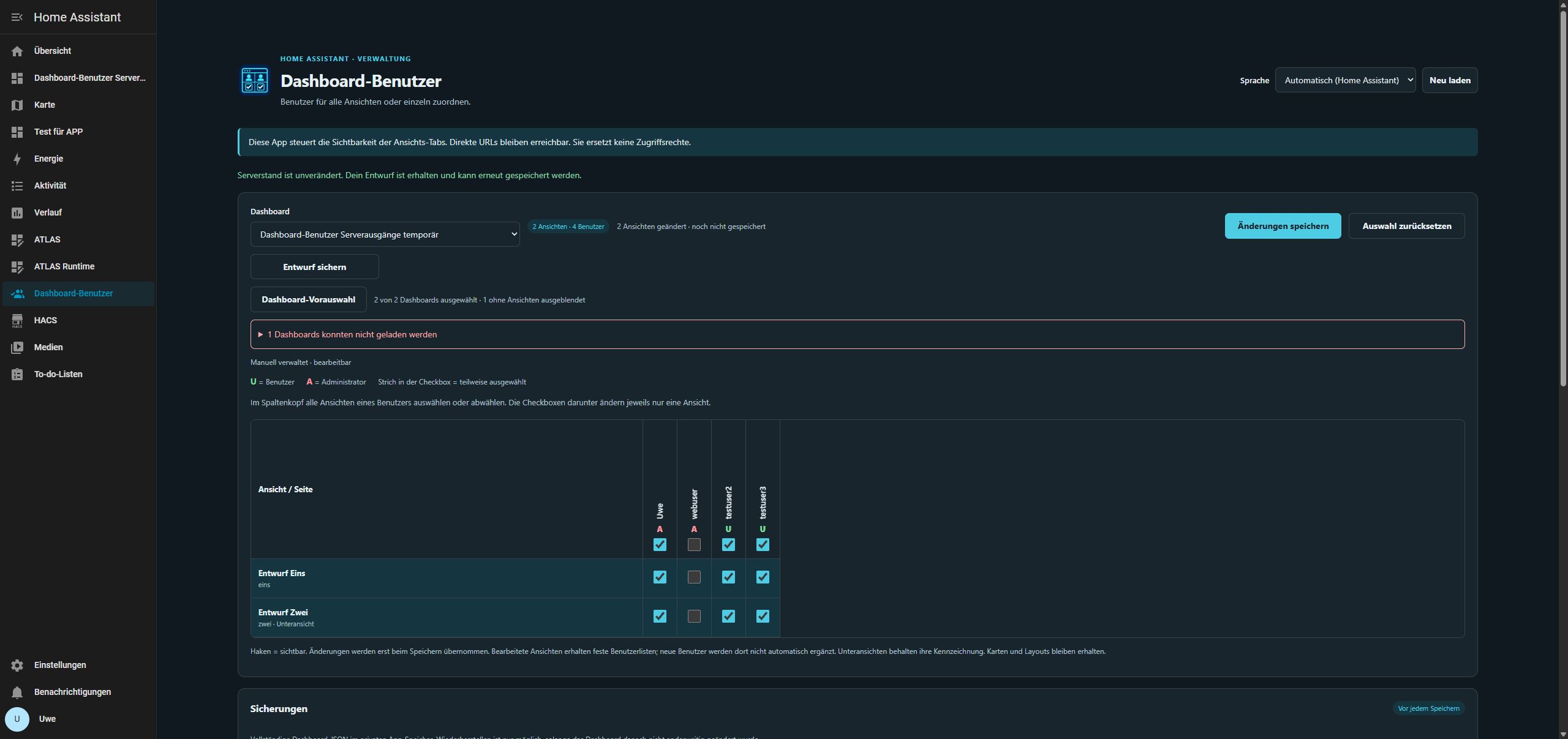
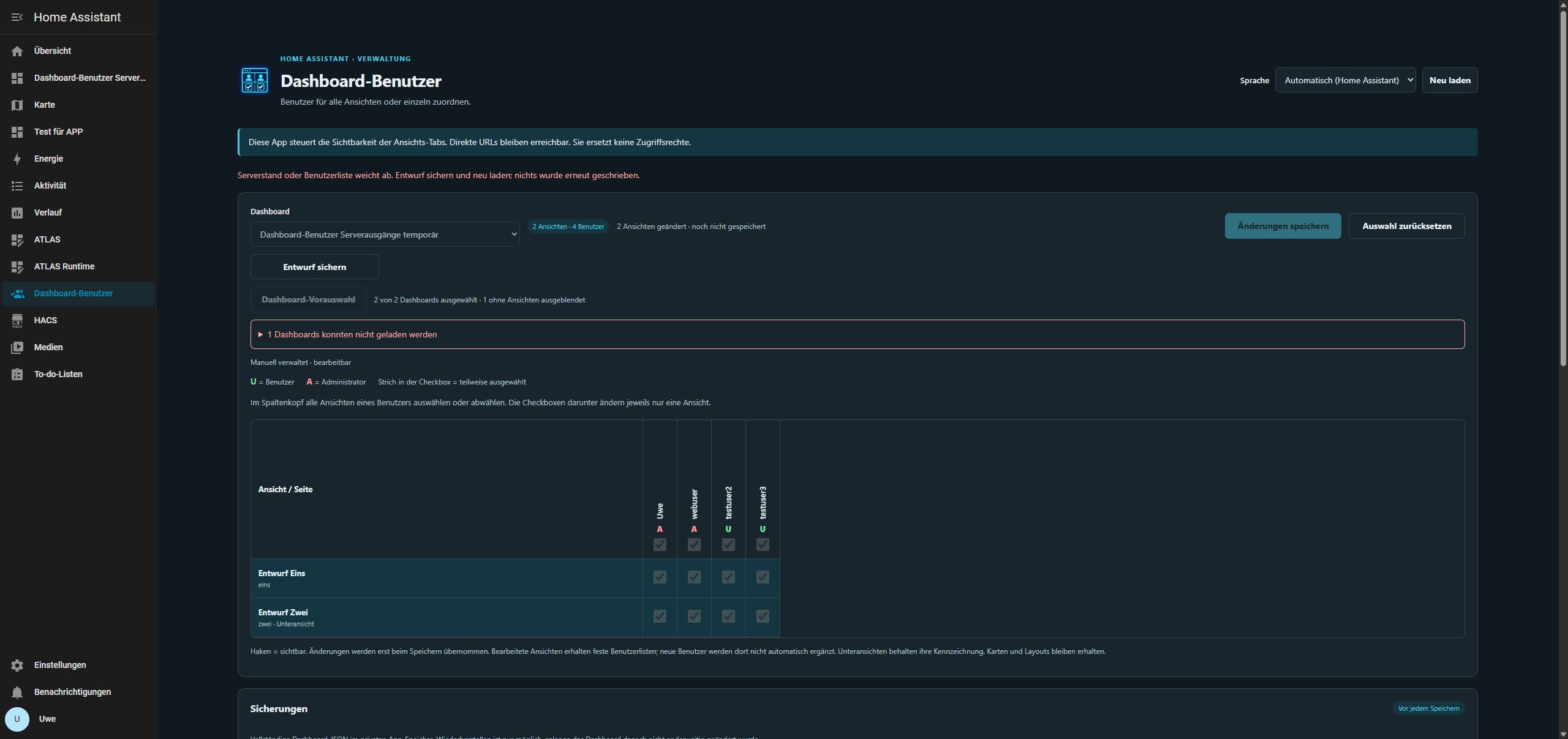
0.1.10 – Interruption during HA write acknowledgement checked on .177: After a fresh full backup, the app’s real WebSocket connection to HA was aborted for exactly one save command targeting its own test dashboard, immediately after sending and before receiving the result message. No successful write status reached the app and the commit did not perform its subsequent read-back. HA nevertheless saved the two intended user lists, independently verified from its stored configuration.
The app reported Unknown save outcome, preserved the complete checkbox draft and blocked another save. Check server state established over a new connection: Already saved; no additional write. Exactly one additional private dashboard backup was created and all 13 existing backups remained; checking the server left the HA file byte-identical. Cards, names, paths and the subview were unchanged. Temporary instrumentation was then removed, the original app rebuilt and the test dashboard cleaned up. Existing data including “Test für APP” and the original dashboard selection are preserved; the package remains version 0.1.10.
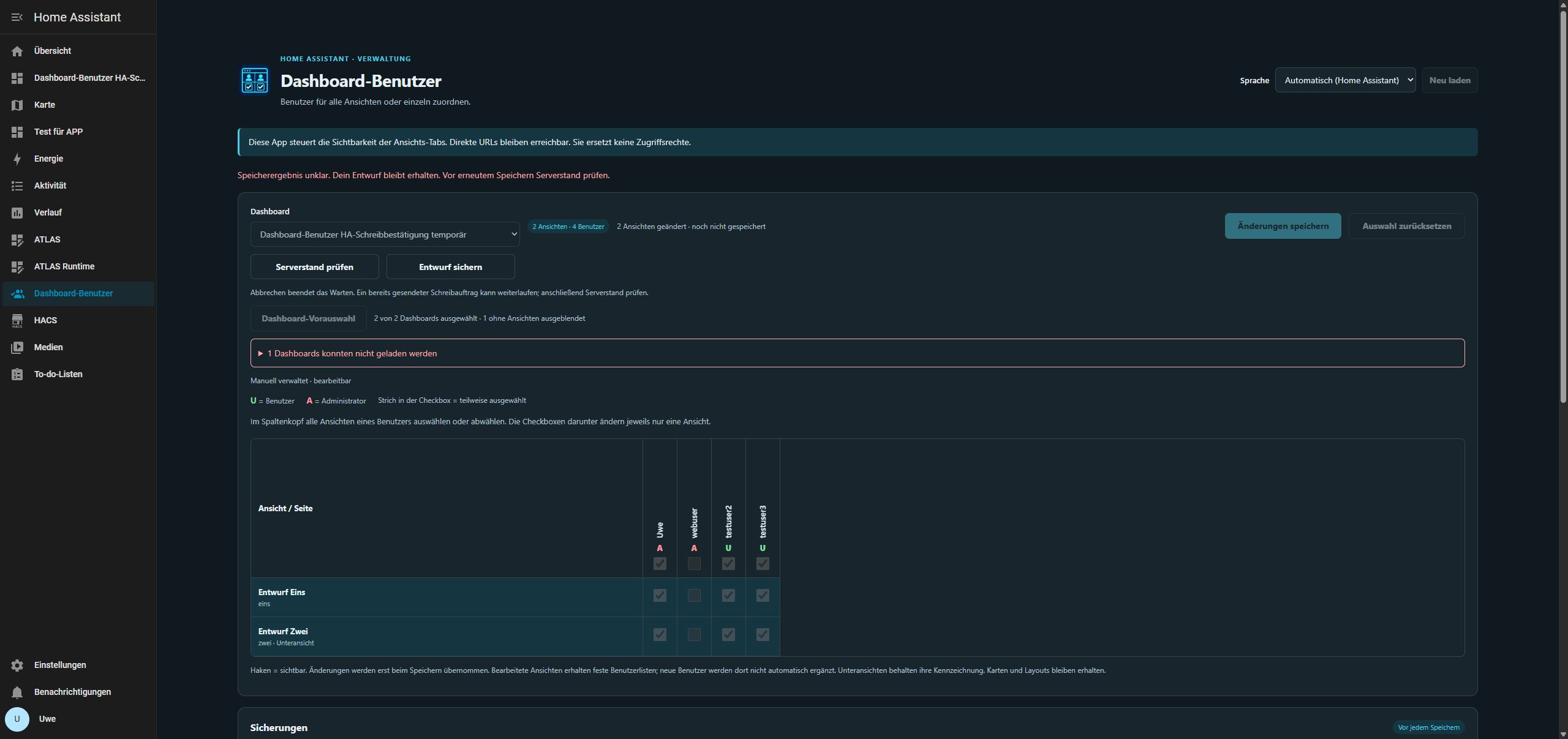
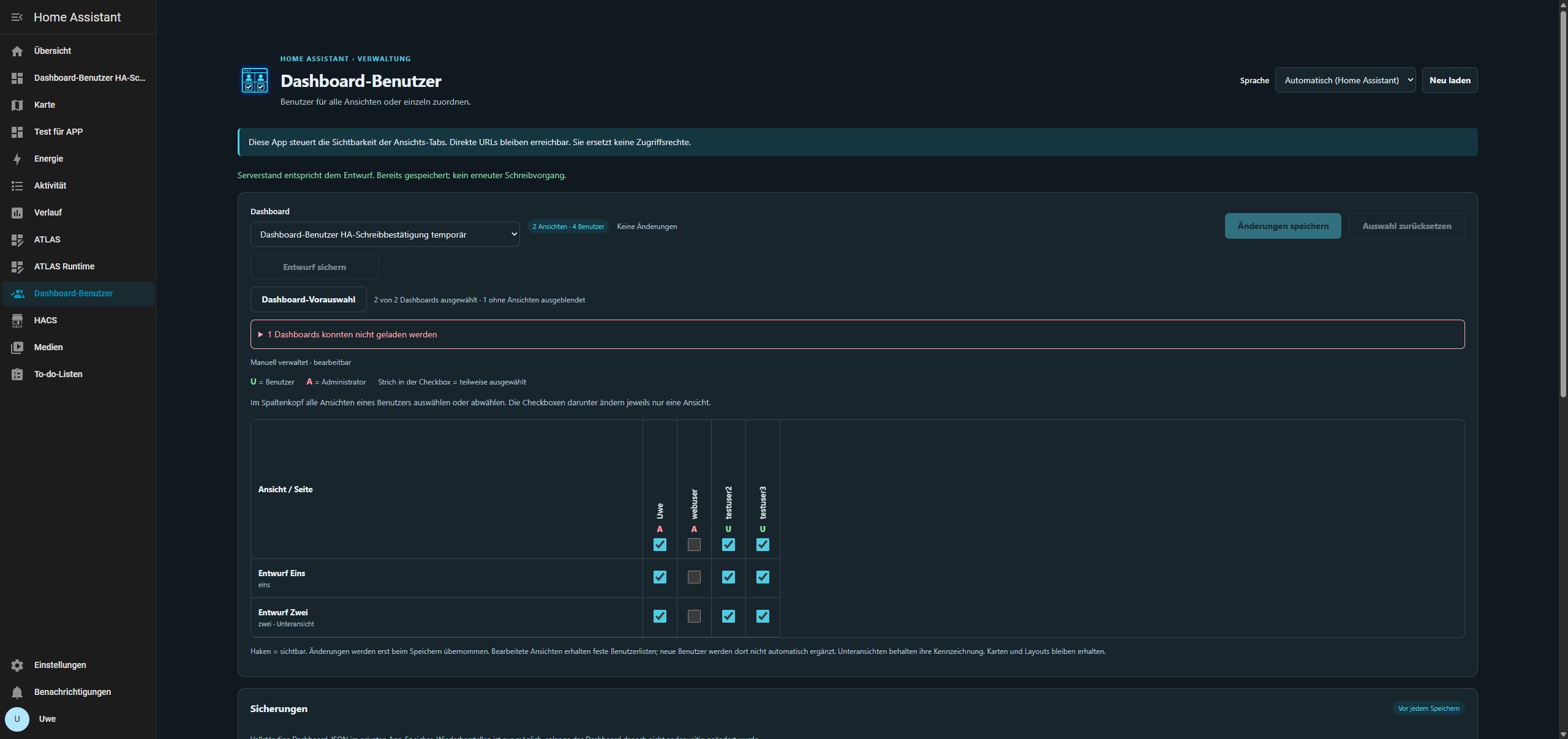
0.1.10 – Lost confirmation checked on .177: After a fresh full backup, temporary one-shot instrumentation was scoped to a separate test dashboard only. The app actually wrote two assignments to HA, successfully read them back and then aborted the real HTTP response transport to Ingress before the interface received confirmation. This is a targeted response-channel failure with real HA data, not just a mocked test or physically unplugging a network cable.
The interface reported an unknown save outcome, preserved every checkbox selection and disabled repeat saving. Check server state recognized the already saved draft without another write. Exactly one additional dashboard backup was created; the HA file remained byte-identical after reconciliation. Cards, names, paths and subview were unchanged. Instrumentation was fully removed, the original app rebuilt and the separate dashboard deleted: all 23 checked HA files including “Test für APP” and all 19 app source files match their originals byte-for-byte; seven ATLAS projects, plugins, trash, selection and automatic language were preserved. Version and published package files remain unchanged at 0.1.10.
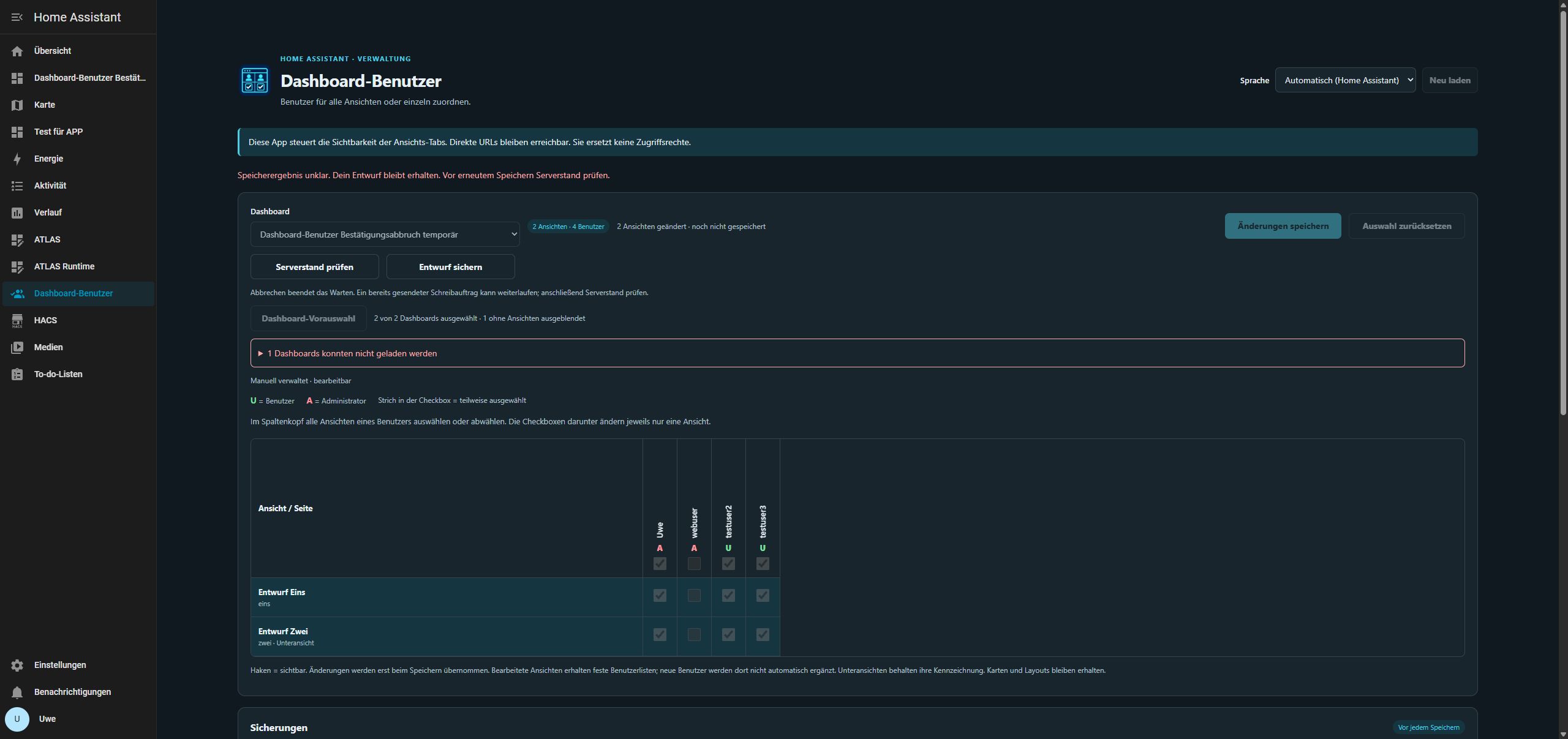
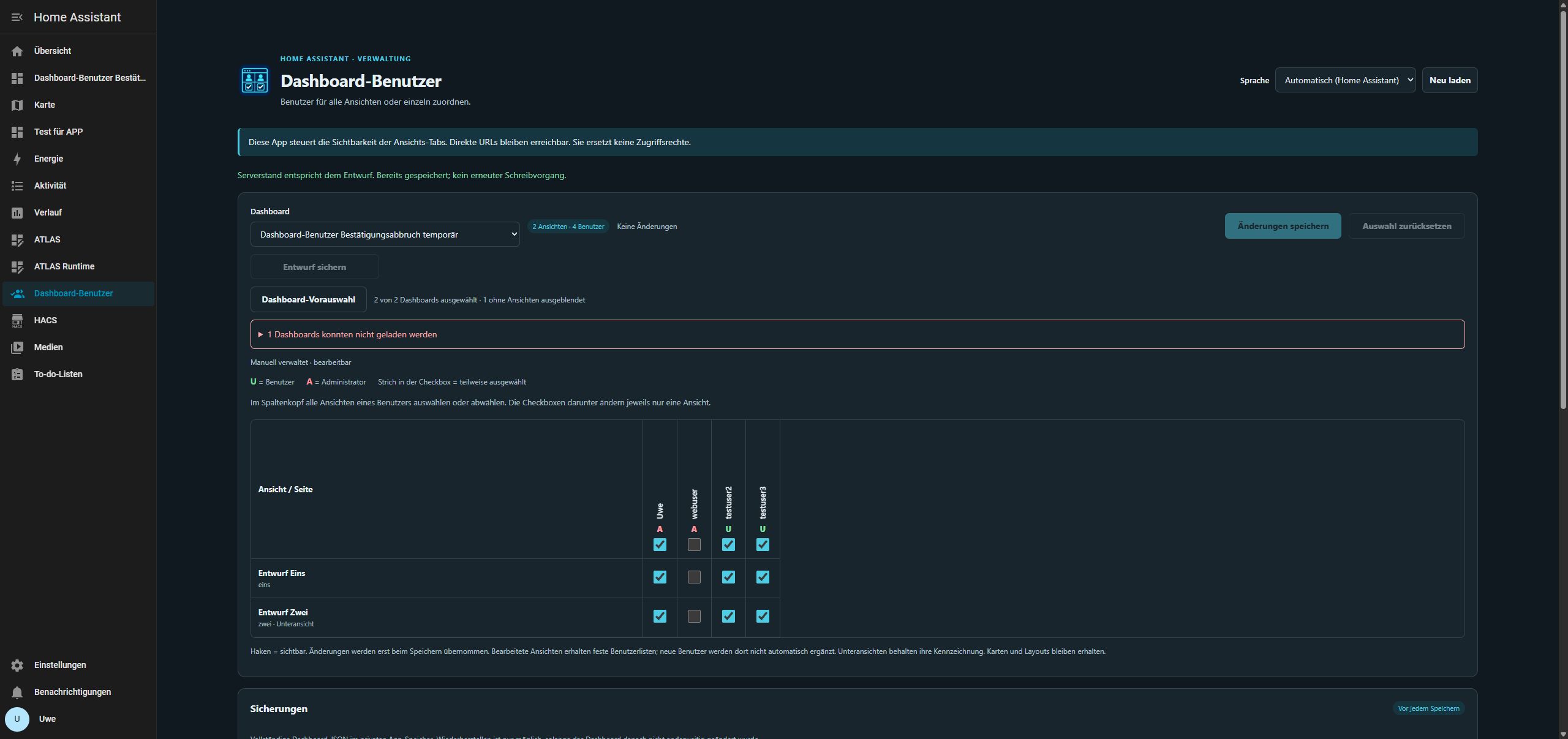
0.1.10 – Recovery verified, experimental label removed: A fresh full backup was created on .177 on 20 October 2026. App-only restoration recovered the twelve original private dashboard backups and removed the extra test marker while preserving the current HA test configuration. Full HA 2026.10.2 restoration then included settings/history, share, media, SSL and all apps. HA and the app start again; “Test für APP” retains 18 views and four users, automatic language and saved selection.
After restart, 21 HA files including all existing Lovelace files are byte-identical. The two other checked registries retain all 22 devices and 73 entities with their settings; only runtime modification timestamps and the app version recorded by HA update. Seven ATLAS projects, plugin management and trash state are unchanged. The existing ATLAS-HA connection works without entering credentials again. Full recovery removes the test dashboard created after the backup. This is restoration on the existing test installation, not rebuilding empty hardware. 33 Python and 19 Node tests and amd64/aarch64 Docker builds pass. 0.1.10 only removes the experimental package label and updates version/evidence; save logic and permissions are unchanged. .68 and production systems were not used.
The checks cover prevented save commands, an intervening change by a second session, aborting the HA WebSocket before write acknowledgement and aborting the HTTP response channel after successful HA read-back. All three server outcomes were observed using separate test data, without guaranteeing every possible interruption timing. No physical LAN/power outage was triggered. Guidance for uncertain writes still applies.
Earlier checks – status at that time
Conflicts and interrupted connectivity tested with 0.1.8 on .177: After a fresh full backup, two app tabs opened the same separate test dashboard. Tab A saved a change; the stale draft in tab B was rejected with a conflict message. Its selection remained visible and tab A’s server state stayed byte-identical. After deliberately resetting/reloading, the second change could be saved without overwriting the first.
During a controlled app stop, an ongoing save completed fully and was confirmed. The next save attempt against the stopped app changed no data. After restart, the reachability/session error appeared, the unsaved draft remained and no automatic retry wrote data. After comparing the server state and reloading, a deliberate save worked again. Cards, names and the subview were preserved; the separate test dashboard was then removed.
0.1.9 – Timeout/cancellation finding fixed: Installed on .177 after a fresh full backup. With the app fully stopped, the local 30-second limit works; manual cancellation and connectivity errors also preserve both changed rows. No write request; server file byte-identical. The downloaded draft contains both planned assignments and no tokens. After restarting the app and renewing the session, deliberate saving succeeds; cards, names, paths and subview remain intact. The separate test dashboard was removed, original selection and automatic language restored; the four existing Lovelace files including “Test für APP” are byte-identical to the backup.
33 Python and 19 Node checks pass, covering fetch/body timeout, late responses, cancellation, uncertain writes, read-only server reconciliation, conflicts and lost confirmation after a completed HA write. Docker builds for amd64/aarch64 and UGSo app CI pass. A hard network cut precisely between the HA write and confirmation remains unproven live; that path has automated coverage. Full app/HA backup restoration remains open, so experimental status stays. .68 and production systems were unchanged.
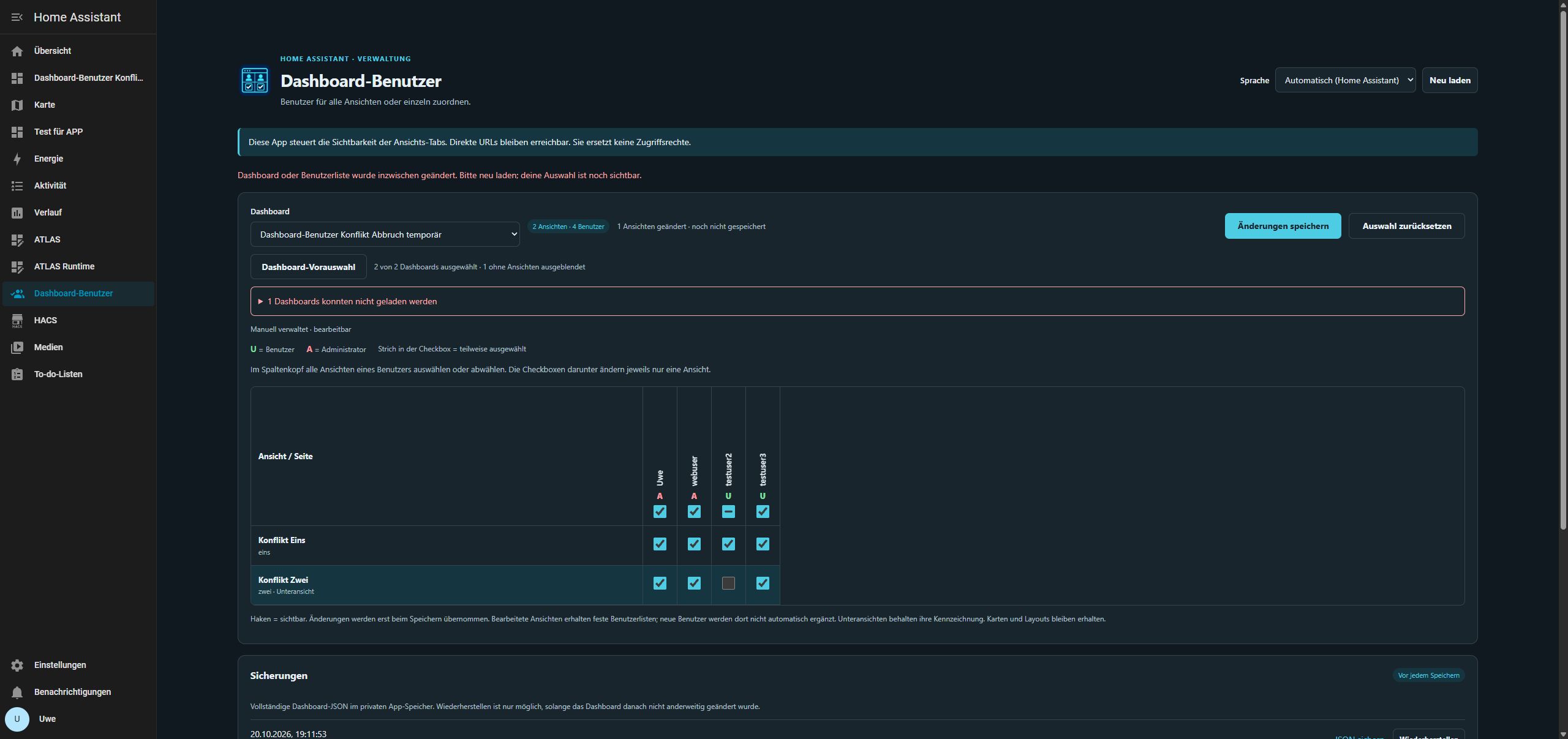
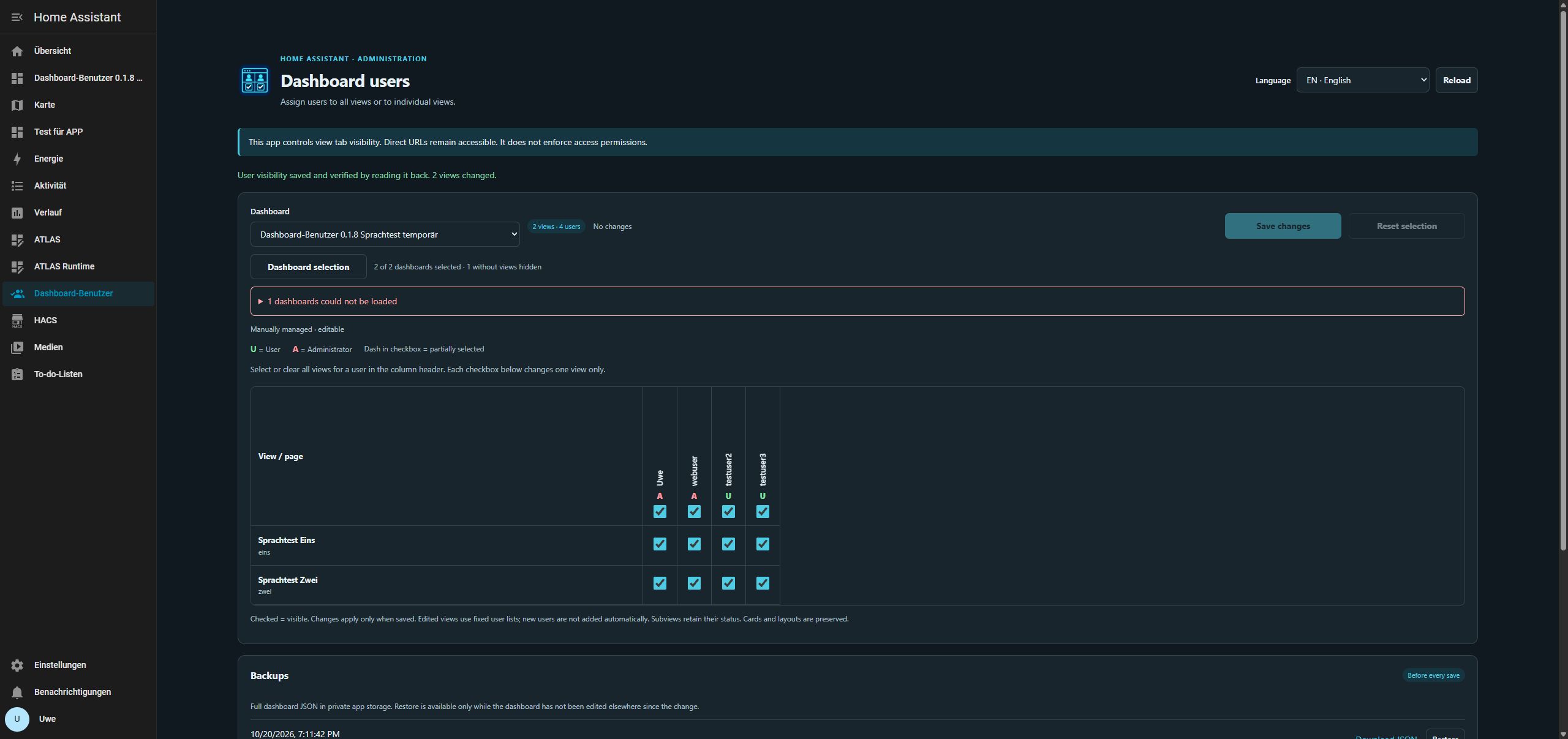
0.1.8 – Save confirmation localization fixed: The complete sentence and view count use a single DE/EN/FR translation, regardless of the API response language. An already displayed success message follows later language changes without reloading. This resolves the mixed-language issue recorded below for 0.1.7.
Updated on .177 after a fresh full backup and tested using a separate two-view dashboard: three real saves in DE/EN/FR and subsequent language changes passed. Each save changed two assignments without altering cards or names. Automatic language and the original selection restored; existing backups preserved. All 28 Python and twelve Node checks passed, including an English API reply, later language changes and an unchanged result. amd64/aarch64 Docker builds and the UGSo app CI passed. .68 and production systems unchanged. Experimental status remains until the outstanding recovery/conflict checks are complete.
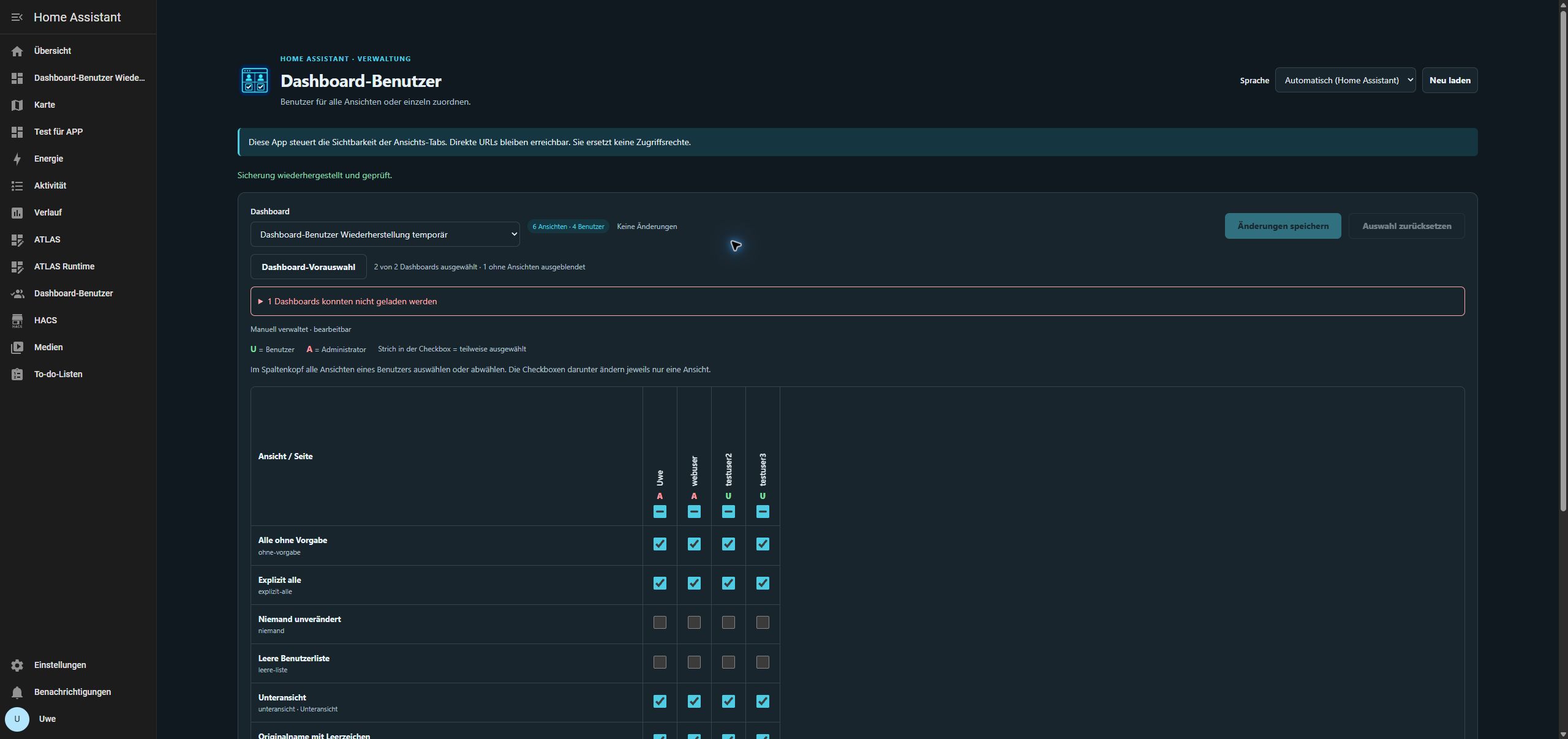
Saving and restoring with 0.1.7 passed on .177 on 20 October 2026: After a fresh full HA backup, a separate temporary dashboard with six views was tested. Bulk selection/deselection for webuser and an individual correction changed exactly three views. After saving and reloading, only the intended user lists had changed. Untouched visibility values (true, false, []), cards including nested content, paths, the subview and original names with surrounding whitespace were preserved.
The downloaded automatic backup contained exactly the complete original dashboard configuration. Restore first created a counter-backup of the modified state, then restored the original storage file byte for byte. The temporary dashboard was removed, the original selection restored and all four existing Lovelace files, including “Test für APP” and the dashboard catalog, remained byte-identical. Three full backups remain on .177; private recovery records and PC backups are preserved. .68 and production systems were not modified.
Full app/HA backup restoration and real conflict/interruption testing remain open. Minor known display issue in 0.1.7: the save success message may contain an English sentence within the German interface; the restore message appeared correctly in German. Functional verification passed.
Version 0.1.7 updated on .177 after a fresh full backup: icon visible in the HA app tile and interface header, with DE/EN/FR headers visually checked and captured. Selection, 18 views, four users and the existing private dashboard backup preserved. No assignments saved; all four Lovelace files unchanged against the backup. All 28 Python and eleven Node checks, PNG delivery, ZIP icon comparison and amd64/aarch64 Docker builds passed. Language preference restored to automatic.
User confirmation on 20 October 2026 for 0.1.6: The update on the affected installation succeeded. “Übersicht aktuell” now appears only once, and the previously saved dashboard selection is preserved. This confirms the fix in the originally reported case, complementing automated alias/duplicate tests and the update test on .177. No additional agent access to the production system was performed for this confirmation.
Version 0.1.5 tested on .177 after a fresh full backup: empty map hidden, unconfigured overview error shown separately, cancellation and persisted empty/re-enabled selection verified after reload. Dialog visually checked in DE/EN/FR. No user assignments saved; all four Lovelace files unchanged. All 26 Python and ten Node checks and amd64/aarch64 Docker builds passed.
The user successfully tested bulk and individual assignments, saving and reloading in 0.1.3. After a full backup, the local app on .177 was updated to 0.1.4. Automatic language selection follows German → English → French → German without reloading the app. Names and assignments are preserved; all four Lovelace files, including “Test für APP”, have the same SHA-256 hashes as the backup after testing. Offline frontend, API, preservation and conflict tests also pass. No production system was modified. Full HA backup restoration of the app remains unverified. An unconfigured default dashboard may return config_not_found; select an existing manually managed dashboard instead.