
Sidebar Manager
Global profiles in 0.1.14
Personal sidebar: Each user can save their own layout. A JSON backup captures a snapshot of groups, links, colors, visibility and order. To import it, select the file, review the preview and click Save. The resulting copy can be edited independently.
Assigned profile: An administrator saves their sidebar as a named template and selects users by name. One user can have several profiles to choose from. While a profile is active, the sidebar uses its groups, colors and order. Personal settings remain saved. To change them, select My own sidebar.
Enforced global profile: One template applies to everyone. The administrator maintains it centrally. Other users see its name and can refresh it. The shared sidebar changes the layout. Home Assistant permissions still apply.
- Open Appearance → Edit sidebar → Sidebar profiles.
- As an administrator, open Manage profiles, choose a template, enable Enforce this profile for everyone, and click Save.
- With enforcement active, administrators can see and edit the template's groups directly in Edit sidebar. The template is read-only for regular users.
- A notice appears when the template changes. In Edit sidebar, click Refresh global profile to reload the saved template. The button is available while a global profile is active.
Without enforcement, users can choose their own sidebar or an assigned profile. Removing enforcement restores their previous selection. The administrator editor was tested on the PC test system (64-bit) for group display and saved visibility. The user later confirmed the workflow.
If the buttons are missing when opening the editor directly, check frontend.extra_module_url in the installation section. A dashboard resource on its own loads Sidebar Manager when you open a dashboard that uses it.
New in 0.1.11: Aligned sidebar icons
Group and custom-link icons now measure 24 × 24 px. In the collapsed sidebar, they share the same horizontal center as native Home Assistant icons.
Verified on the ARM test system (Pi 5) with Home Assistant 2026.11.0 on 11 November 2026. Group icons align with the Overview icon in both sidebar layouts. The Logs, Automations, and States link icons are centered in the collapsed sidebar. The user test also passed.
New in 0.1.10: Home Assistant shortcuts
Marketplace requires Home Assistant 2026.11.0
The Marketplace shortcut is offered only on HA 2026.11.0 or newer. It is hidden on older or unknown versions. The package minimum remains HA 2026.10.3; other presets are independent of this requirement. The link does not install Marketplace or grant additional permissions.
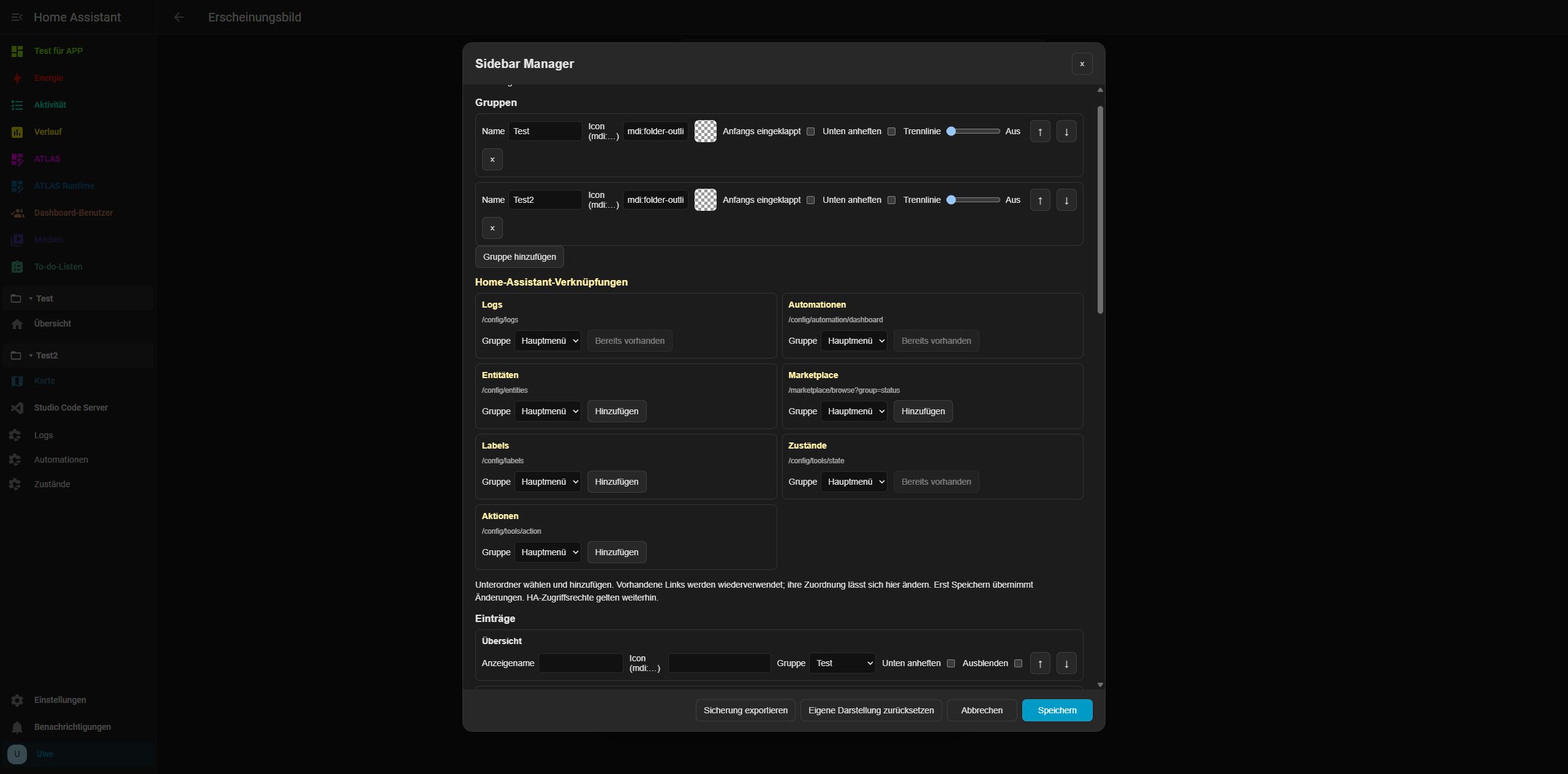
Open Edit sidebar → Manage groups and links → Home Assistant shortcuts, choose a folder and click Add. The section uses two columns on desktop and one on narrow screens.
| Shortcut | Default icon | Target |
|---|---|---|
| Logs | mdi:history | /config/logs |
| Automations | mdi:robot | /config/automation/dashboard |
| Entities | mdi:shape | /config/entities |
| Marketplace · HA 2026.11.0+ | mdi:store | /marketplace/browse?group=status |
| Labels | mdi:label | /config/labels |
| States | mdi:list-status | /config/tools/state |
| Actions | mdi:run | /config/tools/action |
Icons are editable defaults for new links. Existing links are reused by URL and retain their custom names and icons, including legacy States URLs at /developer-tools/state. Existing groups, colors, order and VIS/dashboard settings are not migrated or reset. Save in the Manager applies link settings; Cancel discards the open draft.
Verified on the ARM test system (Pi 5) with HA 2026.11.0 · 8 November 2026
Following a fresh full backup, the desktop two-column layout, four new destinations, default icons, folder assignment, Cancel, Save and full reload passed. Temporary test links removed; user preferences, colors, groups, test dashboard and resources exactly match the PC backup. 73 automated tests pass, including Marketplace version boundaries. Mobile layout and older HA versions were not separately live-tested.
HA 2026.11: color preview fixed
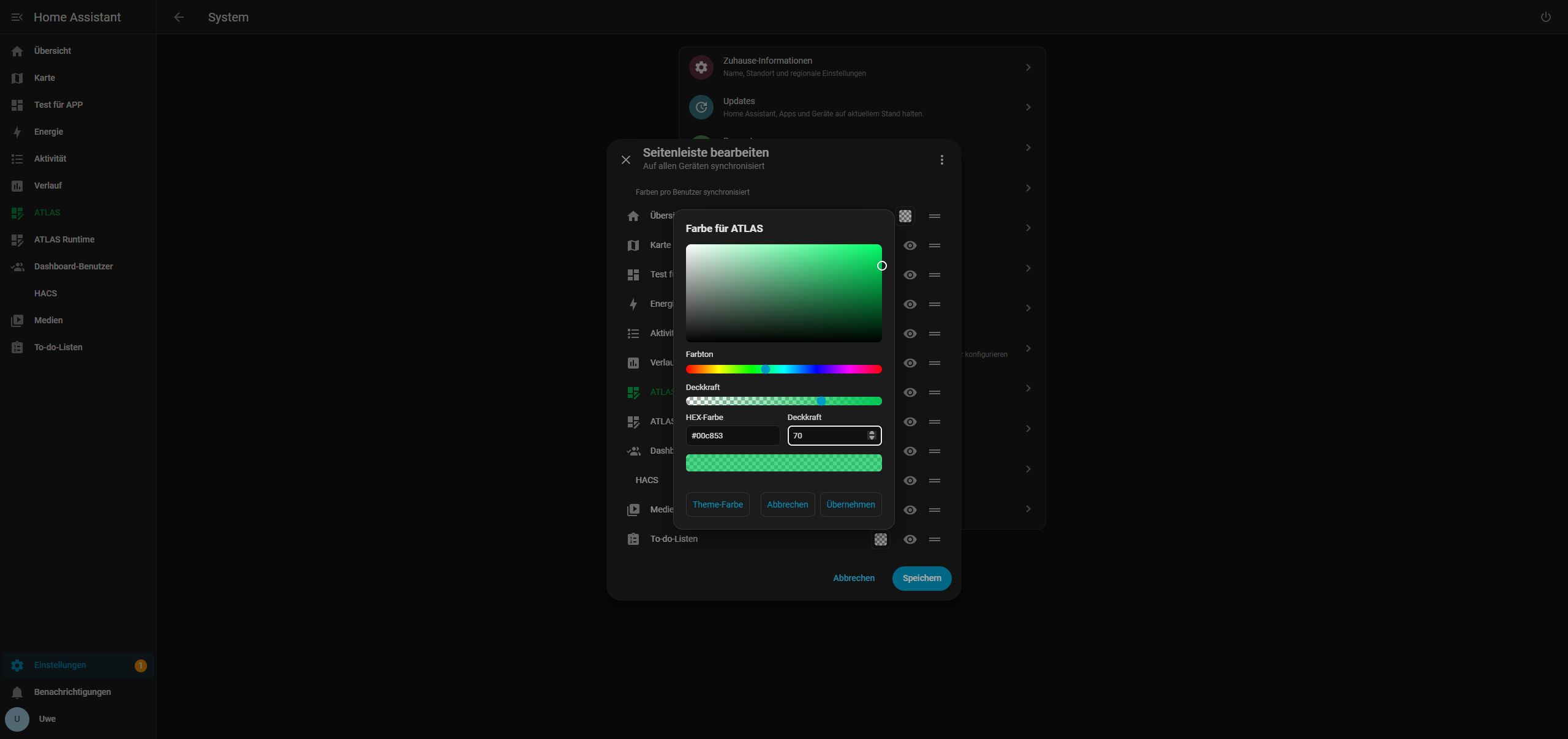
Version 0.1.9 fixes missing text/icon colors in the native edit dialog, including group colors. Verified on the ARM test system (Pi 5) (port 80), Core 2026.11.0 / frontend 20261028.4: colors, opacity, Cancel, Save, theme reset and a full reload. All 72 automated tests pass. Disposable group/link removed; the exported layout again matches the pre-test backup. Existing settings and “Test für APP” are preserved.
Scope, results and remaining findings.

0.1.14 · Home Assistant ≥ 2026.10.3 · DE / EN / FR · MIT
Organize Home Assistant's sidebar with folders, colors, opacity and custom links, directly from Edit sidebar. Move main entries and folders with the native drag handles. No HA core files are replaced.
GitHub · Release 0.1.14 · HACS
New in 0.1.8: links in the sidebar editor
Verification status, 2 November 2026
0.1.8: successful functional verification confirmed by the user on 2 November 2026. Links, colors, moving entries and the Link/Ext. link labels work. Syntax checks, the build and 70 automated tests also pass. Existing screenshots show earlier verification stages. Codex did not perform an additional independent HA runtime test for this release; the user’s test host and HA version were not separately specified.
Custom internal and external links now also appear in Edit sidebar. Links without a saved position initially appear at the end; existing ordering is respected. Hidden links remain available for editing.
- Color field: the same color/opacity picker used for HA entries. Theme color removes the override. Saved link colors apply immediately when sidebar rows are created.
- Link type: the settings button displays Link for internal targets and Ext. link for external HTTP(S) targets, instead of the folder name. Clicking opens that link’s settings. Its folder assignment is preserved and also shown in the tooltip.
- Drag handle: reorder links alongside other entries, including within their assigned folder. Dragging alone does not change folder membership; choose the folder in the link settings. Keyboard sorting remains available.
- Eye: hide or show a link without deleting it or its settings.
- Save/Cancel: apply or discard color, visibility and order changes in the HA editing dialog. General link settings are still saved in the Manager.
Link ordering and visibility remain in ugso_sidebar_manager_v1; colors stay in the existing ugso_sidebar_colors_v1 record. Custom link IDs never enter HA’s native saved panel order. Existing settings, opening modes and missing panels are preserved.
Local checks exercise the built JavaScript package with simulated HA storage, DE/EN/FR labels, color selection, Save/Cancel, sorting, preserved folder membership and recovery after a failed save. The user confirmed successful functional verification on 2 November 2026; this acceptance is recorded separately from the automated tests.
Install with HACS / Marketplace
This is a frontend plugin, not a Supervisor app or a dashboard card. Add https://github.com/rockbaer2007/ha-sidebar-manager as a custom repository in HACS, category Dashboard (plugin internally), and download Sidebar Manager. A public repository is not automatically included in the default catalog. The package uses a HACS-compatible structure for Marketplace.
Marketplace installation confirmed
On 5 November 2026, the user confirmed successful installation through Marketplace. This supplements the documented Sidebar Manager 0.1.9 checks. The exact Marketplace version was not separately specified; this does not certify every version.
Back up HA first. Merge this into the existing frontend: section of configuration.yaml, keeping themes and other modules:
frontend:
  extra_module_url:
- /hacsfiles/ha-sidebar-manager/ha-sidebar-manager.jsRemove or disable the old Sidebar Colors and Sidebar Organizer module entries; load only Sidebar Manager. Check the configuration, restart HA and reload the browser. A dashboard resource alone does not load the extension reliably when another HA page is opened first.
Manual installation
Download ha-sidebar-manager.js from Releases and copy it to /config/www/ha-sidebar-manager/ha-sidebar-manager.js. Use this module URL instead:
frontend:
  extra_module_url:
- /local/ha-sidebar-manager/ha-sidebar-manager.jsDo not load the manual and HACS copies together. The ZIP includes the same bundle, configuration examples, license and DE/EN/FR instructions. Existing versioned local installations such as /local/ugso-sidebar-manager/0.1.7/ha-sidebar-manager.js can keep that path if the matching file is present. For updates, retain your chosen path and reload the browser.
Websites inside HA
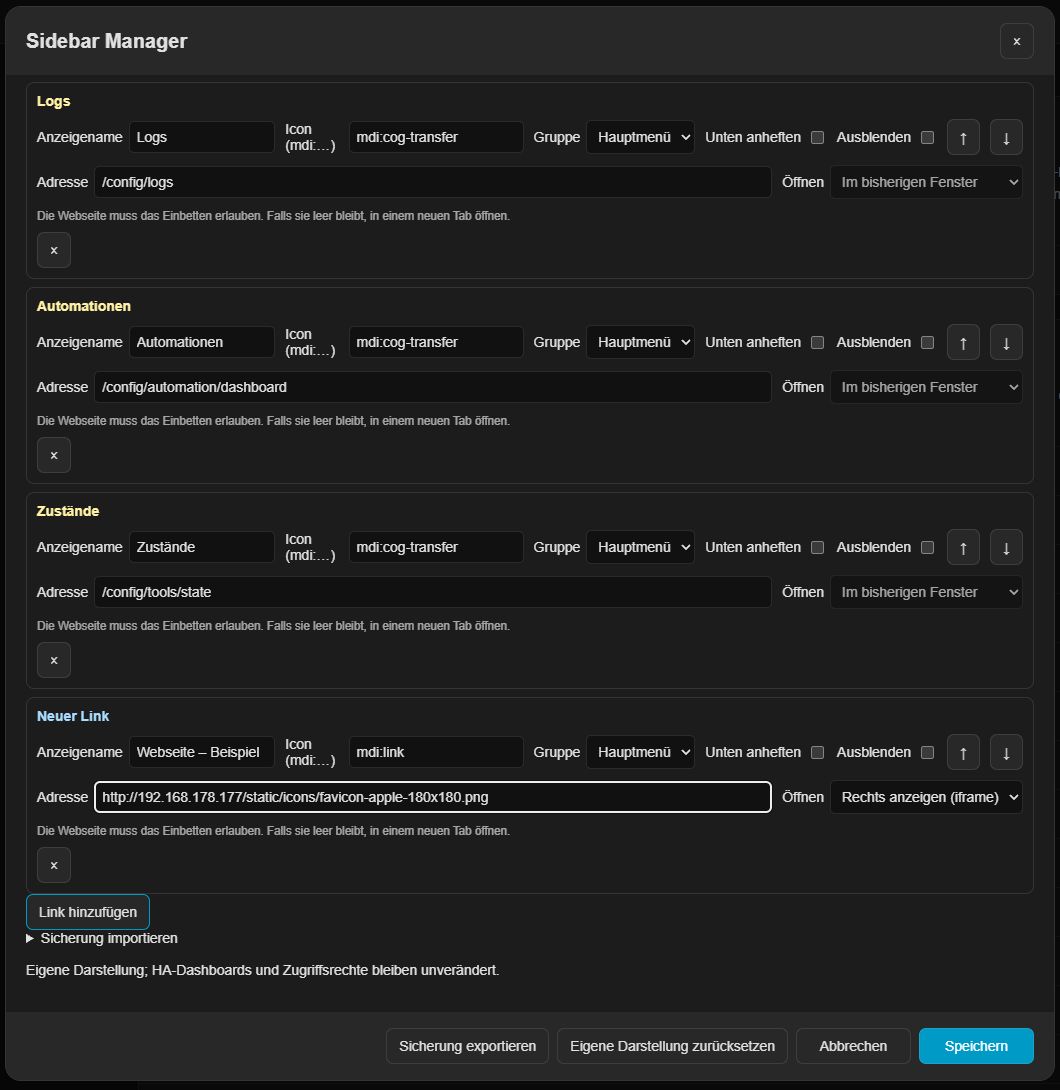
New-tab links work without additional configuration. For Display on the right (iframe), also merge this entry into configuration.yaml or its existing panel_custom list:
panel_custom:
  - name: ugso-sidebar-web
    url_path: ugso-sidebar-web
    module_url: /hacsfiles/ha-sidebar-manager/ha-sidebar-manager.js
    embed_iframe: false
require_admin: falseFor manual installation, change module_url to /local/ha-sidebar-manager/ha-sidebar-manager.js. It must match your frontend module URL. Validate and restart HA. No sidebar_title is set: this registers a hidden host panel, not another menu entry. See panel-custom.example.yaml and panel-custom.manual.example.yaml in the release ZIP.
The target website must allow embedding. CSP/X-Frame-Options, HTTPS-to-HTTP restrictions or the website's own login can prevent display. A new-tab alternative remains available. No HA token is passed to the website. Registering the host panel does not change permissions on HA's destination pages.
Use
Hold the sidebar heading to open Edit sidebar. Color fields, eye buttons and the native drag handles remain available. Manage groups and links opens the Manager. The interface follows your HA language: German, English or French, with English fallback.
- Choose entry colors and opacity; Theme color clears an override. The checkerboard indicates transparency.
- Create folders with names, MDI icons, colors and initial expanded/collapsed state. Assign existing main-menu entries or custom links to folders; choose Main menu to move them back.
- Drag folders between main entries in the native editor. Group membership is preserved: the folder and its children move together. Keyboard sorting is also available (Alt+Up/Down on a row).
- Bottom-pinned folders also appear at the bottom in the editor. Moving one before a normal menu block releases its bottom pin; Cancel preserves the original pin and position.
- Set the folder separator to 0–4 px. Zero means off. It appears only while the group is expanded, at the end of the block, in the icon's color/opacity, with 1 px spacing above and below.
- Add Logs, Automations, Entities, Labels, States and Actions with a selectable folder; Marketplace is additionally available from HA 2026.11.0. Matching existing links are reused; names and MDI icons remain editable.
- Own internal links are pale yellow in settings; external HTTP(S) links are light blue. Choose a new tab or iframe for external links. Older links retain their previous same-window behavior until edited. These settings highlights do not replace custom sidebar colors.
- The Manager's Save commits its layout. Color/native order edits in the underlying HA dialog require that dialog's Save. Cancel discards the respective open draft.
Settings, profile and notifications remain native. Hiding an entry or changing its group does not grant or restrict access.
Screenshots and verification
Color picker and group settings:
Actual 0.1.7 folder placement and collapsed separator on the authorized ARM test system (Pi 5):
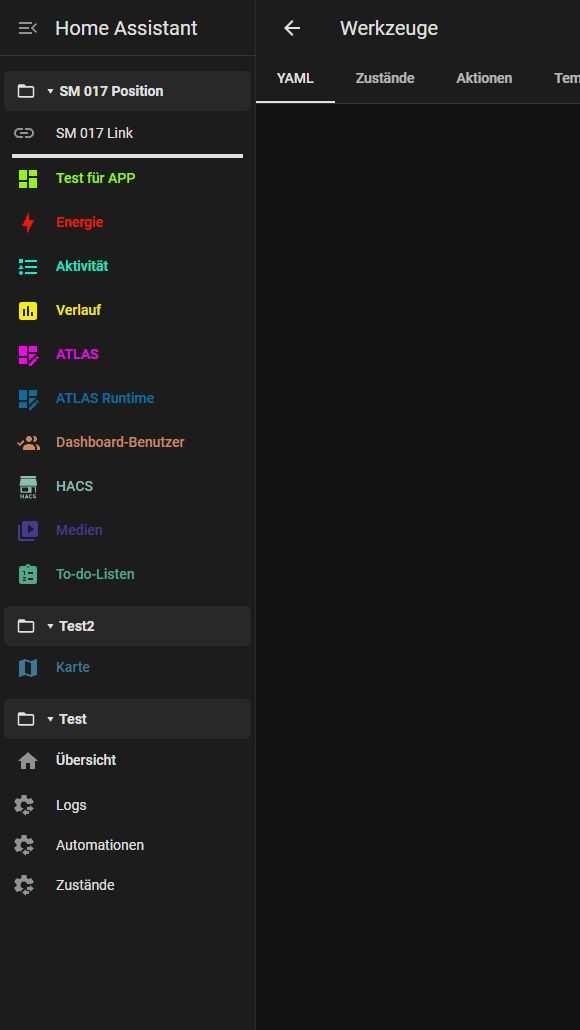
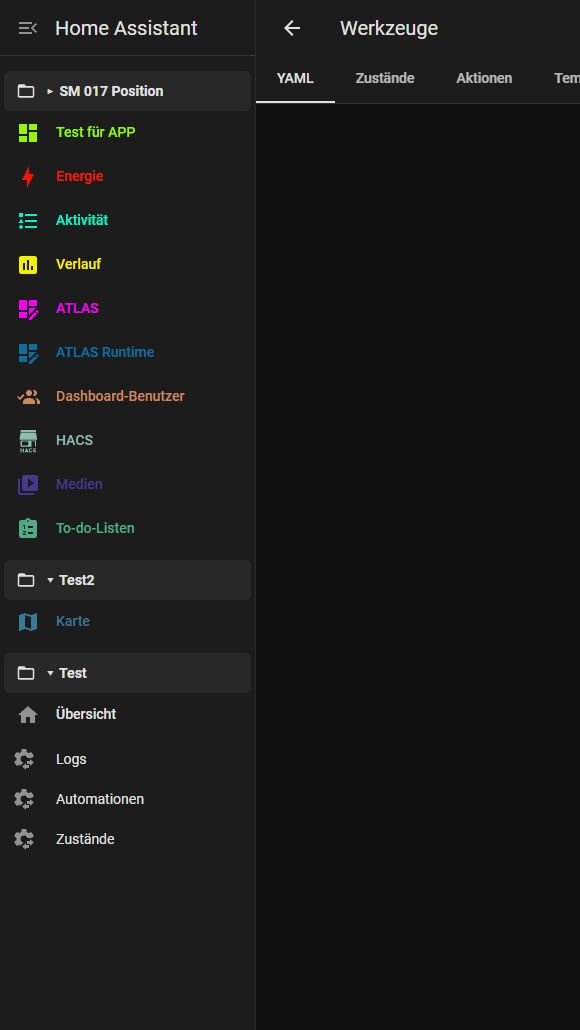
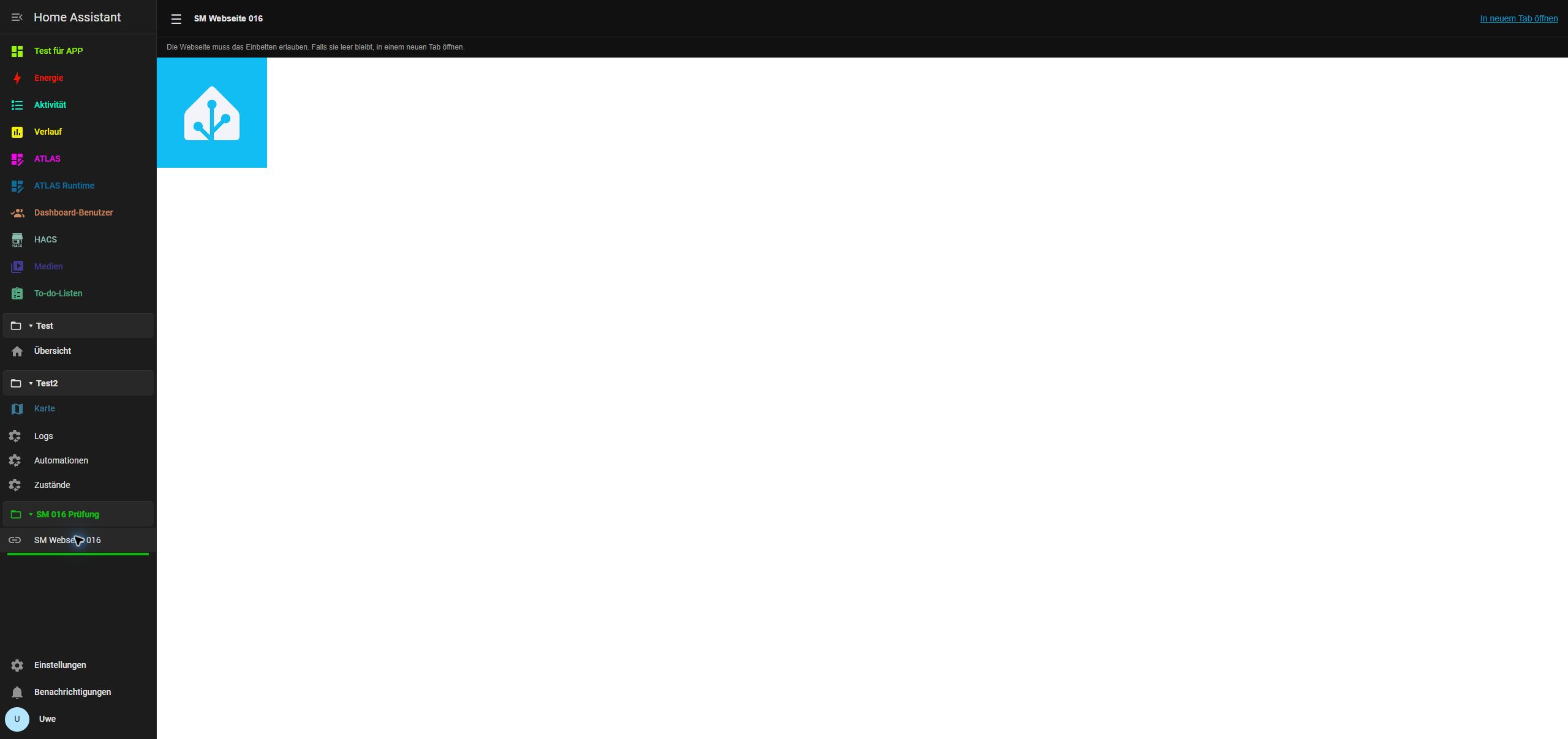
0.1.7 was verified on HA 2026.10.4, port 80: Save/Cancel, moving a bottom-pinned test folder, browser reload, folder membership and expanded-only separators. Earlier tests cover colors, opacity, custom links, iframe/new-tab opening and layout export/import. Existing settings and the protected test dashboard were preserved; temporary test objects were removed. 60 automated tests pass. The color/link screenshots also illustrate unchanged functionality from 0.1.6. Detailed test history.
HA 2026.10.3 is the intended minimum, not a separate live-tested installation. No live compatibility claim is made for every external website or Marketplace version.
Preserve settings and switch safely
- Create a full HA backup. Export existing Organizer settings and Manager/color backups where available.
- Disable the previous sidebar module entries without deleting their files or user settings. Install only one Sidebar Manager copy.
- Existing Sidebar Colors data stays under
ugso_sidebar_colors_v1. Manager layouts stay underugso_sidebar_manager_v1, per authenticated HA user and synchronized between clients. - Organizer YAML/layout import is not implemented. Keep its export and recreate the desired folders/links manually. No automatic Organizer migration is claimed.
Missing panels remain stored. Read failures and unsupported schemas never write defaults. Before writes, the previous layout is saved in local browser storage; blocked storage prevents saving. Concurrent edits are checked before writes; uncertain confirmations are read back rather than blindly retried. This is not an atomic server-side compare-and-swap.
Complete JSON backups (format version 2) include folders, links, labels, icons, colors, visibility, pinning, order, separators and the native HA panel order/hidden-panel list. Access tokens and other HA preferences are excluded. Older layout backups (format version 1) contain organization only; missing colors are not invented. Reset affects the open Manager draft until saved. To roll back, restore the previous module entry, restart HA and reload the browser; leave stored user settings intact.
Development and scope
Node 22 or newer: npm ci, npm run check, npm run build, npm test. Tagged releases build the self-contained JS and installable ZIP automatically.
Native sidebar internals can change with HA frontend updates. No per-device layouts, arbitrary CSS/templates, automatic Organizer migration or configurable header/width are included. Pinned items remain within the scrollable main navigation.
Original UGSo implementation based on Sidebar Colors. Sidebar Organizer by Viet Ngoc is a behavioral reference; no Organizer source is embedded. MIT license: see LICENSE.