
Printer
From Studio 0.1.273, select Properties → WIDGET → Cartridges → Style → Cartridges / Bar. Cartridges keeps the graphics side by side; Bar displays 1–6 rows with a name, horizontal fill and percentage. Both styles use the same entities, colors and warning threshold. Missing values remain —; legacy toner selection maps to bars. Full/half cartridge size affects graphics only. Printer package 0.1.1 includes the corrected selection; existing 0.1.0 packages also work with the updated Studio.
Printer 0.1.1 is an independent external widget set by rockbaer2007. The style selection shown here requires Grafik Visual Studio 0.1.273 or newer. It displays a printer with its current status and 1–6 ink or toner levels, using cartridge graphics or horizontal bars.
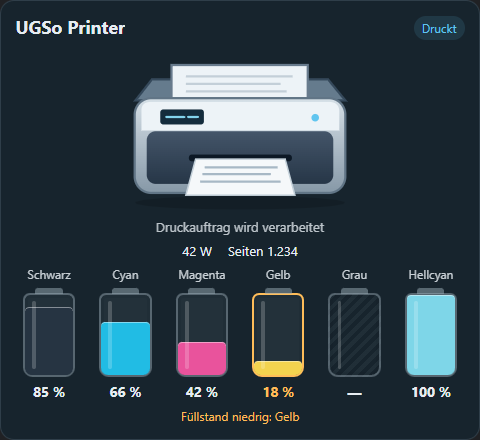
Style: Cartridges
The screenshot shows the runtime with test data.
Style: Bar
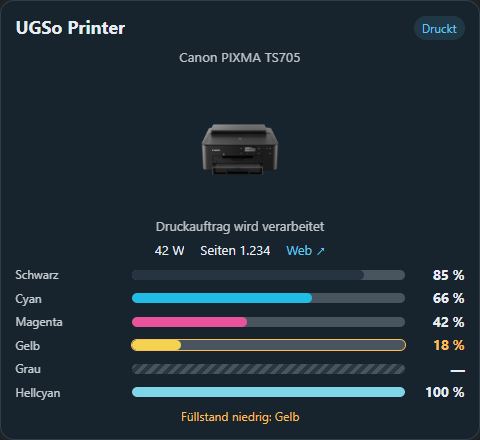
Under Properties → WIDGET → Cartridges → Style, select Bar. The runtime screenshot below uses six supplies with test data: Yellow at 18% is below the 20% warning threshold and is highlighted. Gray has no reading, so its bar is hatched and displays — rather than an invented percentage. This screenshot uses the German interface.
Original project
Inspired by HA Printer Card by ADNPolymerase, published under the MIT license. The original is a Lovelace card. Printer uses original SVG artwork, its own Studio renderer and explicitly selected Home Assistant entities. No upstream source or artwork is bundled. It appears as a separate palette set and does not belong to Industrial.
Installation
- Update Grafik Visual Studio to 0.1.273 or newer.
- Download ugso.printer.wg.
- Install under Settings → Widget packages → Local.
- Add Printer → Drucker from the palette and select status and supply entities using ….
The package contains one declarative widget definition, an original palette icon, instructions and an MIT license. It contains no executable package code. Source and package instructions.
Settings
From Studio 0.1.270, Properties → WIDGET also provides CSS Font & Text, CSS background, CSS borders, and CSS shadow and spacing, alongside General CSS. New groups start disabled. Enable their checkbox to configure fonts, background/image, border color/width/style, one radius for all corners (0 = square), shadows and spacing. CSS styles the visible printer card rather than a hidden surface behind it. Status and supply colors retain their own settings. Existing packages remain compatible.
| Section | Settings |
|---|---|
| Printer | Caption, status entity, model mfp (multifunction), inkjet or office. |
| Cartridges | Count 1–6, Style → Cartridges / Bar, low threshold 0–100 %, default 20 %. |
| Cartridge 1–6 | Individual percentage entity, caption and color. The first N entries are active. Later bindings remain saved and are polled again when the count is increased. |
| Status message | Optional display. Separate entity, otherwise the printer entity's state_message or state_reason. |
| Additional values | Optional power and page-counter entities. |
| Colors and size | Background, text and printing-state color. Default 480 × 440 px, minimum 240 × 280 px. |
The count determines distribution; individual cartridge X positions are unnecessary. Long captions are truncated when space is limited. Tooltips retain full names and values. From Studio 0.1.263, properties only show the selected cartridges: a count of 4 shows groups Cartridge 1–4, a count of 5 shows Cartridge 1–5. Hidden cartridge settings remain saved and reappear when the count increases.
Status and readings
Language follows the Studio DE/EN setting automatically, including automatic selection from Home Assistant. There is no separate widget language selector. Status labels, hints and properties are translated; custom captions, model names and entity messages remain unchanged.
Common states map to ready, printing, sleep, warning, stopped, offline or unknown. While printing, the sheet moves and the LED blinks. Browser reduced-motion preferences disable these animations. Errors and jams take priority; a supply warning alone does not stop the printing animation.
Editor and runtime read the same current Home Assistant values. Missing or invalid levels display —, rather than 0 %. Valid numbers are clamped to 0–100 %. At or below the threshold, the cartridge and its reading are highlighted, with affected names listed below.
Custom printer photo and cartridge size
Studio 0.1.262 adds a model name, Standard graphic / Custom image selection and a printer photo field accepting a URL or /local/... path. Entering an image path automatically enables the custom photo, including URLs without a file extension. Upload image embeds a PNG, JPEG, WebP, GIF or SVG file up to 2 MB in the saved project. URL and /local/... sources must also be accessible in the runtime.
The photo keeps its aspect ratio and falls back to the standard drawing if missing or unavailable. Status and supplies remain active; the sheet animation belongs to the standard drawing. Cartridge size offers Full size / Half size, defaulting to half size. Labels and percentages retain their size. Existing Printer packages receive these settings when Studio is updated; reinstalling the package is unnecessary.
Printer web interface
The web interface URL field displays a Web ↗ link. A manually entered URL takes priority. auto uses the first HTTP/HTTPS address in the status entity's configuration_url, web_url, url, device_url or printer_uri attribute. Without a matching address the link stays hidden; no device discovery is performed. An empty field also hides it. The web interface opens in a new tab.
Scope of this version
This first version uses explicitly selected entities. It has no automatic device/supply discovery, wear parts, socket control or test printing. All bindings are read-only. The separately available original card offers further features.